Capabilities
Standardised runtime interfaces that vendors implement and the platform resolves, configures, and orchestrates.
Beyond tools and triggers, an extension can expose capabilities — standardised runtime interfaces the platform knows how to orchestrate. Model capabilities are declared one MODEL FAMILY at a time in provides.models, each built with defineModels({ family, runtime }), where runtime is a plain object typed by that family's capability config; webSearch, webhooks and discovery sit on a toolkit instead.
How the platform resolves a capability
When a workflow asks for "an LLM" or "STT", the platform walks the extension registry in a fixed order. This is what lets you swap OpenAI for self-hosted vLLM without touching workflow definitions.
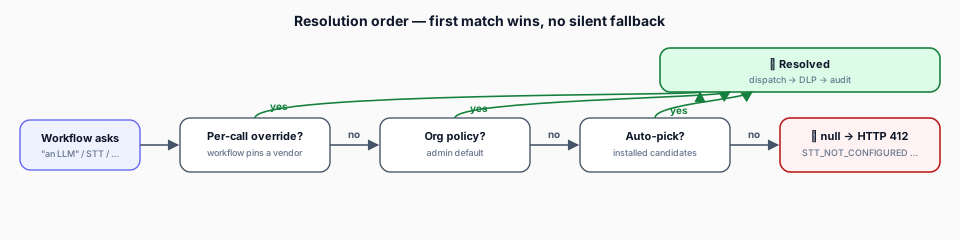
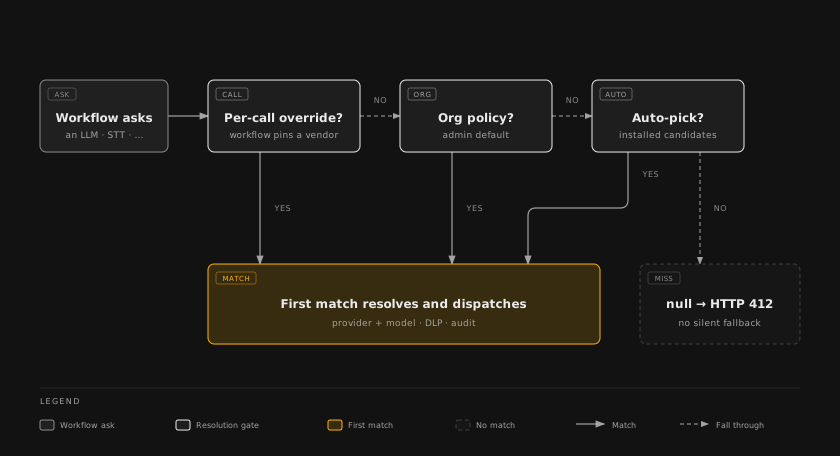
No silent fallback. If nothing matches, the resolver returns null and the platform answers with a typed 409 CAPABILITY_NOT_CONFIGURED error — never a hidden swap to a vendor the org never installed.
The capabilities
Chat, completion, streaming. The full LLM provider surface.
Speech-to-text — batch + realtime WebSocket / SSE.
Text-to-speech — batch + realtime streaming.
Vector embedding generation.
Content-safety classification with org-policy verdicts and governance hits.
Image synthesis from text prompts.
Video generation from text prompts.
Optical character recognition and document parsing.
Provider-selected internet search for ranked result links, with a recency window and published dates.
Verify, transform, subscribe, poll, and test vendor webhooks.
Selectors, resource browsing, access scopes.
| Capability | Helper | Default benchmark | Direction |
|---|---|---|---|
| LLM | defineModels({ family: "llm" }) | MMLU · HumanEval · GPQA | higher better |
| STT | defineModels({ family: "stt" }) | WER | lower better |
| TTS | defineModels({ family: "tts" }) | MOS | higher better |
| Embedding | defineModels({ family: "embedding" }) | MTEB · MIRACL | higher better |
| Image | defineModels({ family: "image" }) | — | — |
| Video | defineModels({ family: "video" }) | — | — |
| OCR | defineModels({ family: "ocr" }) | — | — |
| Moderation | defineModels({ family: "moderation" }) | — | — |
| Web Search | defineWebSearch() (on a toolkit) | — | — |
| Webhook | defineWebhooks() (on a toolkit) | n/a | — |
| Discovery | defineDiscovery() (on a toolkit) | n/a | — |
How capabilities appear in the UI
The admin Settings → Platform → Extensions page is product-centric. Clicking a vendor opens its sheet; the Includes tab answers "what does this extension give me" in two sections, in this order:
- Models — what AI calls run on, first, because it is the first thing a provider brings. One row per model family the vendor declares — LLM, Embeddings, Speech-to-Text, Text-to-Speech, Image Generation, Video, OCR and Moderation — carrying the family name, its model count (4 models), the model names in a sentence, and via Microsoft Excel when a single product provides it. Opening a row shows the providers behind that family and its allowlist editor. The org-wide default is not chosen here: it lives on the Extensions page's Models & defaults tab.
- Agent tools — one row per product that ships tools, triggers, or a non-model capability: what the product does in words, then its counts (9 tools, 2 triggers), then the Enabled · org-wide switch, which reads Not enabled when it is off. Triggers are not a section of their own — they are counted inside the row's sentence. The section header carries the totals (36 tools, 4 triggers across 8 products), and a long vendor folds the tail into N more products. Web Search selects a provider rather than a model, so it rides as a chip on the product row that declares it instead of appearing under Models.
A vendor with neither models nor tool products shows Nothing to list for this extension in place of both sections.
Model policy (allowlist mode)
For intelligence capabilities, admins can restrict which models are usable:
| Mode | Behaviour |
|---|---|
| All (default) | Every model the vendor provides is available |
| Allowlist | Only explicitly enabled models are available |
Stored per-vendor per-capability via the org policy API. Organisation-scoped — different orgs can pick different subsets from the same vendor.
Disabling and replacing a vendor
Before disabling a vendor, the admin UI calculates affected workflows and knowledge bases. If that impact cannot be calculated, it is shown as unknown and must be acknowledged; it is never treated as zero.
For every capability the vendor owns, you can select an enabled replacement. Only selected defaults and supported references are migrated. Capabilities without an enabled replacement are listed explicitly, and resources that require a semantic migration (for example, re-indexing an embedding knowledge base) are not silently rewritten. The operation is retry-safe: replacements and defaults are applied before products are disabled, and a partial failure leaves the remaining products available so you can retry safely.
Benchmark scores
All intelligence capabilities support optional benchmarks on model definitions, shown in the extensions UI to help admins compare.
interface BenchmarkScore {
  name: string;        // e.g. "MTEB Average", "WER", "MOS"
  score: number;
  source?: string;     // e.g. "Artificial Analysis"
  updatedAt?: string;  // ISO date
}
Combining capabilities
One extension can provide a toolkit and any number of model families side by side. Each family is its own provided item with its own id, so an organization enables the LLM without also enabling the OCR:
export default defineExtension({
  id: "my-ai-service",
  // ...
  provides: {
    toolkits: [
      defineToolkit({
        id: "my-ai-service",
        name: "My AI Service",
        tools: [chatTool, imageTool],
        webSearch: webSearchCapability,
        webhooks: webhookCapability,
        discovery: discoveryCapability,
        block: myBlock,
        triggers: [],
      }),
    ],
    models: [
      defineModels({ id: "my-ai-service-llm", name: "My AI Service", family: "llm", runtime: llmCapability, models: [/* … */], defaultModel: "…" }),
      defineModels({ id: "my-ai-service-stt", name: "My AI Service", family: "stt", runtime: sttCapability }),
      defineModels({ id: "my-ai-service-tts", name: "My AI Service", family: "tts", runtime: ttsCapability }),
      defineModels({ id: "my-ai-service-embedding", name: "My AI Service", family: "embedding", runtime: embeddingCapability }),
      defineModels({ id: "my-ai-service-image", name: "My AI Service", family: "image", runtime: imageCapability }),
      defineModels({ id: "my-ai-service-video", name: "My AI Service", family: "video", runtime: videoCapability }),
      defineModels({ id: "my-ai-service-ocr", name: "My AI Service", family: "ocr", runtime: ocrCapability }),
      defineModels({ id: "my-ai-service-moderation", name: "My AI Service", family: "moderation", runtime: moderationCapability }),
    ],
  },
});
A provided item's id is unique across provides.toolkits and provides.models. A toolkit that also ships model runtimes keeps its id on the TOOLKIT and spells each family <toolkit>-<family>, so saved tool ids never move. Families register in the platform's capability index automatically — there is no manual registration step.
Realtime sessions
STT and TTS support realtime streaming via WebSocket or SSE. Sessions run in the purpose-specific
WorkerThreadBackend, which holds the persistent vendor connection. This capability lifetime is
separate from tool execution and is not evidence that a non-Scrydon Agent tool used the
single-use vendor_archive microVM boundary.
interface RealtimeSession {
  sessionId: string;
  send(chunk: ArrayBuffer | string): void;
  onMessage(handler: (data: RealtimeMessage) => void): void;
  close(): Promise<void>;
}

interface RealtimeMessage {
  type: "interim" | "final" | "audio" | "error" | "metadata";
  data: unknown;
  timestamp: number;
}