Knowledge base vs. storage
A workspace holds content in two different ways — file storage keeps the bytes, a knowledge base makes content retrievable. What each surface is for, how they relate, and when to use which.
A workspace holds your team's content in two different ways, and they answer two different questions:
- Workspace storage answers "where is the file?" — it keeps bytes: uploads, chat attachments, voice recordings, notebooks, workflow execution outputs. You browse it, download from it, and reference files in it.
- A workspace knowledge base answers "what do we know?" — it is an indexed, queryable knowledge surface. Agents, workflows, and Chat retrieve from it by meaning or text; nobody "browses" a knowledge base for a file.
The rule of thumb: putting a file in storage does not make it searchable by agents. Adding it to a knowledge base does.
At a glance
| Workspace storage | Workspace knowledge base | |
|---|---|---|
| What it is | The file store every workspace gets, scoped per workspace and environment. | A named, indexed knowledge surface you create in a workspace. |
| Unit of content | A file — any type, stored as-is. | A document or page, ingested and indexed for retrieval. |
| How content enters | Uploads: the workspace file areas, chat attachments, voice recordings, notebook files, workflow execution outputs. | You add documents deliberately — via the workspace UI, Chat, or the Knowledge block — and an ingest pipeline indexes them. |
| How you find things | Browse and download by name — Settings → Storage → Workspace tab. | Retrieval query — agents, workflows, and Chat search it by meaning or text. |
| Who reads it | People, and workflows that hold a reference to a specific file. | Agents, the Knowledge block, Chat search, process flows. |
| Governance | Access-controlled file serving; bytes live on the configured storage provider. | Clearance levels per page, secrets scanning at ingest. |
| Engine | Object storage — no index, no retrieval. | RAG (vector similarity) or Memex (deterministic, zero-model retrieval), chosen at creation — see the engine comparison. |
How the two relate
A knowledge base is not a separate place your files move to — it is a layer above storage:
-
The bytes stay in storage. When you add a document to a knowledge base, its source file lands in the knowledge-base area of workspace storage, on the same provider as every other file. You open and download it from the knowledge base, which checks the document's access and clearance on every download — so a link someone kept stops working once their access is removed. The Settings → Storage browser lists knowledge-base files but does not download them.
The same rule applies to the Storage block and the SDK's
data.storagecalls. In the workflow editor, the Storage block's file picker does not offer knowledge-base files. When a workflow runs, a Storage block reads or lists a knowledge-base document only if the person the run acts for may read that document (knowledge-base access, restricted-document grants, clearance). It never reads a Memex knowledge base's own pages or index files. Use the Knowledge block for those. An OAuth client with no user behind it reads no knowledge-base file through storage.The same holds for changing them: a Storage block cannot overwrite or delete a knowledge-base document unless the person the run acts for may write that document, and it cannot create a new file inside a knowledge-base area at all — documents enter a knowledge base through ingest.
-
The knowledge base adds the index. Ingest extracts and indexes the content so that a query like "what did we decide about data retention?" can surface the right page — something a file browser can never answer.
-
Retrieval is the product. Workflows query a KB through the Knowledge block, agents ground their answers in it, and Chat searches it from the message box.
Where each surface sits
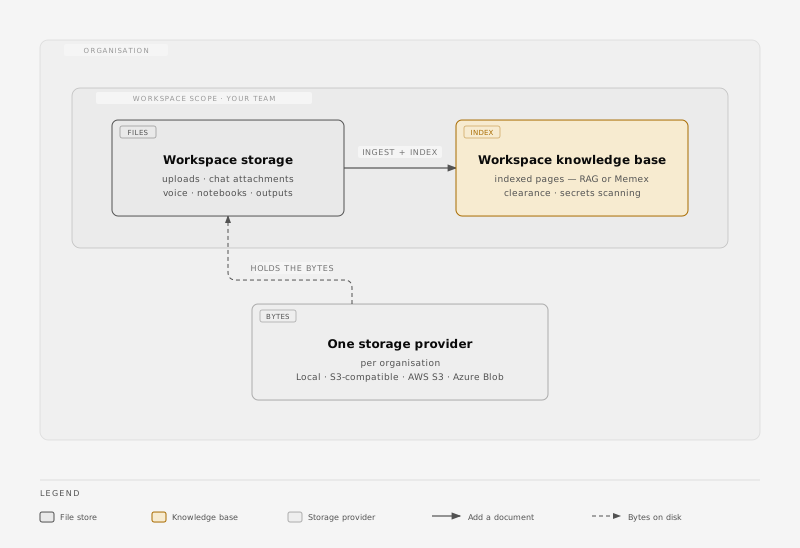
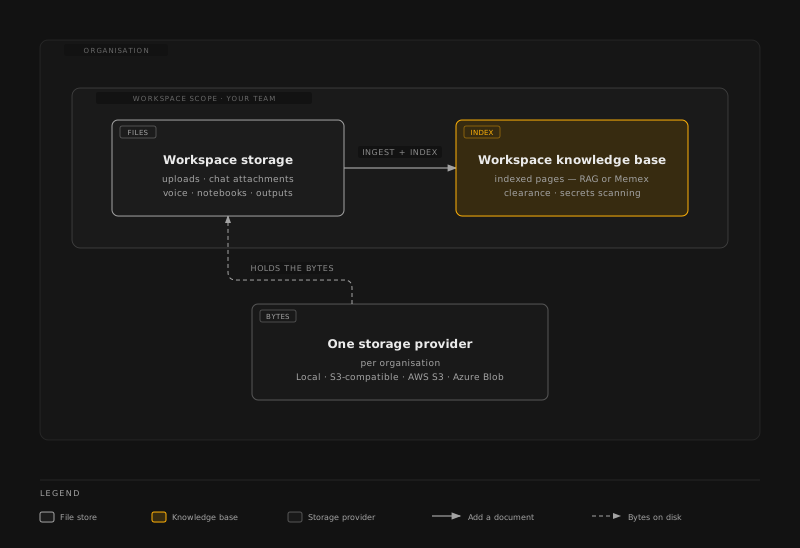
Reading the diagram left to right: files enter workspace storage, and the ones your team works against get indexed into a workspace knowledge base. Underneath both sits the storage provider configured for the organization.
When to use which
- You need to keep a file — a contract PDF, an export, a recording — and reference or download it later: workspace storage. Drop it in the workspace file area; done.
- A team works against the same material every week and agents or workflows should be able to query it — project documents, runbooks, meeting transcripts: create a workspace knowledge base and add the documents to it.
- A workflow produced an artifact (a generated report, a processed file): it lands in workspace storage automatically, under the execution's area. If its content should be retrievable later, add it to a KB as a deliberate step.
Why isn't storage just searchable? Making every uploaded byte retrievable would erase the line between "a file someone parked here" and "knowledge the team curates and clears for use." Knowledge bases are deliberate: content enters by choice, is scanned for secrets, carries a clearance level, and is indexed by an engine you picked. That separation is what lets agents trust what they retrieve.
Related
- Architecture → Knowledge bases — knowledge surfaces, the RAG/Memex engines, and the retrieval benchmarks.
- Knowledge block — querying a workspace KB from a workflow.
- Chat → Knowledge bases — creating and querying KBs from Chat.
- Knowledge base clearance — per-page clearance levels on workspace KBs.