Scrydon

Packs & Authoring SDK

One SDK, one lifecycle — author Integrations, Ontologies, Workflows, Process Flows, and Data Sources and ship them as upload-ready bundles

@scrydon/sdk-authoring is the single SDK for authoring platform extensions. It has five subpath surfaces — one per artifact you can ship:

Pack vs Integration

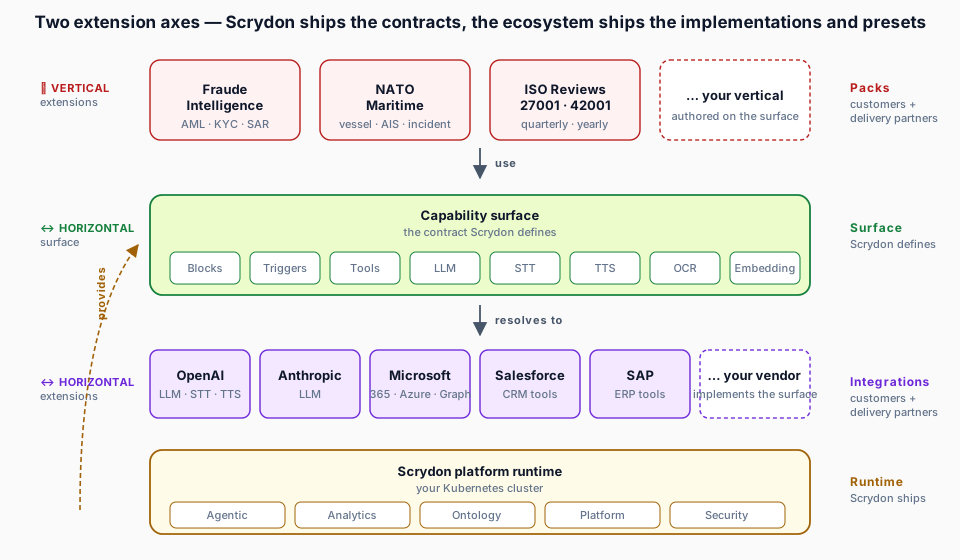
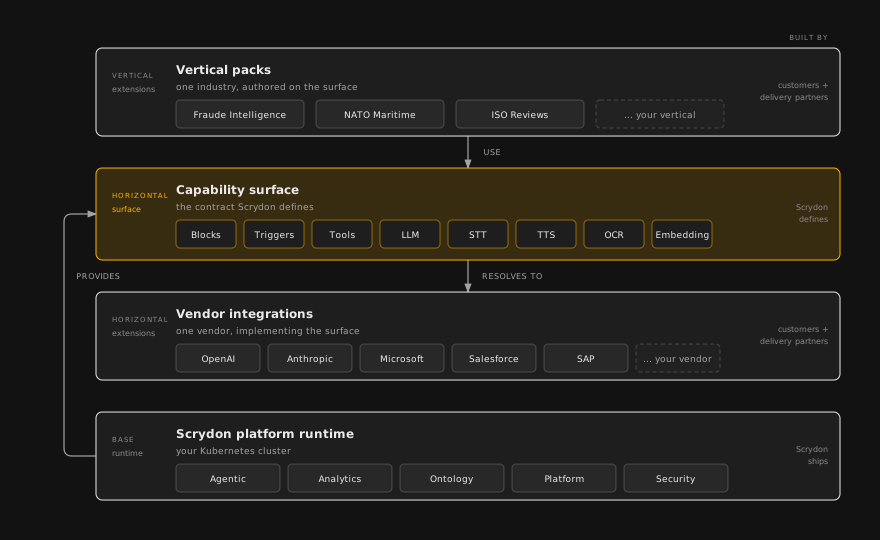
There are two top-level bundle types you upload to Scrydon. Pick by what you are modelling:

  • Integration — a vendor capability bundle. Compiled ESM + manifest + SBOM, runs sandboxed inside the platform. Use it to connect Scrydon to an external service (Slack, OpenAI, Twilio) and expose capabilities — LLM, STT, TTS, embeddings, OCR, video, webhooks, blocks, and tools. Authored with defineVendor, built with bunx @scrydon/sdk-authoring integrations build.
  • Pack — a domain content bundle. Groups an Ontology (typed Object Types, Link Types, Action Types), zero or more Workflows (HITL gates, approval routes, automations), a Process Flow (stages, tasks, personas, action templates), zero or more Data Sources (declarative poll sources — REST request, field-mapping DSL, typed column list), and zero or more custom integrations into one upload-ready archive. A pack contents[] array may mix ontology, workflow, process-flow, data-source, and integration kinds. Use it to ship a domain model together with its standard playbook, data feeds, and any custom vendor integrations it depends on. Authored with defineScrydonPack, built with bunx @scrydon/sdk-authoring pack build.

In short: Integrations bring capability into the platform; Packs bring domain content — and can bundle custom integrations alongside it. Both upload through Settings → Platform → Bundles.

Install

bun add -d @scrydon/sdk-authoring zod
npm install --save-dev @scrydon/sdk-authoring zod

Confirm the install resolved correctly:

bunx @scrydon/sdk-authoring --version

How authoring works

Every artifact uses the same shape:

Compose your artifact with define*() helpers. They are identity functions at runtime — their job is to narrow types so your IDE catches mistakes before you build.

A Zod manifest schema (ManifestSchema, OntologyManifestSchema, ProcessFlowManifestSchema) validates the artifact at build time and again on the server at upload time.

Run the corresponding CLI to produce an upload-ready .tar.gz. Integration bundles contain compiled ESM + a CycloneDX SBOM; ontology and process-flow bundles are pure JSON.

Upload through Settings → Platform → Bundles (or the matching admin API). The platform validates the manifest, persists the bundle, and registers it in the catalog. No redeploy required.

CLI

@scrydon/sdk-authoring ships a single bin with two subcommands. Invoke it via the package-qualified form — it works whether or not the package is installed locally:

SubcommandAuthorsCommands
@scrydon/sdk-authoring integrationsVendor integration bundlesinit, build, test
@scrydon/sdk-authoring packScrydon Pack bundles (ontology + workflows + process flow + data sources + integrations)build, inspect, validate

Ontology packs ship as a subdir of the Scrydon Pack bundle. Standalone ontology bundles use the same defineOntology SDK with no CLI needed (they're embedded in pack bundles or shipped via npm).

bunx @scrydon/sdk-authoring --version
bunx @scrydon/sdk-authoring --help
bunx @scrydon/sdk-authoring integrations --help
bunx @scrydon/sdk-authoring pack --help

bunx @scrydon/sdk-authoring integrations build --entry src/index.ts

# pack build accepts a directory — it auto-discovers pack.ts | pack.mjs | pack.js | pack.json,
# then derives a source directory for EVERY declared `contents[]` entry at
# <baseDir>/<entry.path>. That covers all content kinds — ontology, workflow,
# process-flow, data-source, and integration — so a pack mixing kinds builds
# with no per-kind flags.
bunx @scrydon/sdk-authoring pack build .
bunx @scrydon/sdk-authoring pack build ./my-pack

# `--ontology` / `--process-flow` remain as optional overrides for those two
# kinds' subdir locations; every other kind is taken from contents[].path.
bunx @scrydon/sdk-authoring pack build pack.json --ontology ./ontology --process-flow ./process-flow

Validate a built pack — the platform sync gate, locally

pack validate pointed at a built pack directory (one whose manifest is a pack.json — e.g. dist/<pack> in a Git pack source repository) runs the full platform sync gate locally: file and extension rules, declared-subdir layout, the pack.json schema, and every per-kind manifest.json schema. The rules and error messages are the exact ones the platform's bundle inspector applies on every sync, so a pack that passes here cannot fail sync-time validation — an invalid contents[].kind or a stray undeclared directory fails your PR instead of the next sync.

# Full sync-gate validation of a built pack directory.
# Git pack sources: run this on every dist/<pack> in CI.
bunx @scrydon/sdk-authoring pack validate ./dist/my-pack

# Manifest-only validation (source manifests: pack.ts | pack.mjs | pack.json)
bunx @scrydon/sdk-authoring pack validate ./my-pack/pack.ts
bunx @scrydon/sdk-authoring pack validate ./my-pack --manifest-only

pack build runs the same manifest + per-kind schema validation while bundling, so tarball-based flows get identical guarantees at build time.

Build a Git pack source — pack build-dist

Git pack sources commit built dist/<pack>/ directories that the platform tars and inspects on every sync. pack build-dist owns that whole src→dist transform, so a pack repository needs no hand-rolled build script:

# src/<pack> → dist/<pack>: compiles pack.ts / manifest.ts (manifestVersion
# injected for ontology + workflow DSL inputs), builds integration sources
# deterministically (stable SBOM + byte-stable bundle.tar.gz), skips
# _-prefixed authoring dirs, copies assets — then runs the full sync gate
# on the result.
bunx @scrydon/sdk-authoring pack build-dist src/my-pack --outDir dist/my-pack

Content kinds come from the manifest's contents[] — never from directory naming. Rebuilding an unchanged pack produces byte-identical output, so committed dist/ never drifts across machines.

For a whole pack-source repository, pack build-source is the only build command you need — no build script at all:

# Builds every src/<pack> → dist/<pack> via build-dist, then checks
# scrydon.yaml entry versions against the built artifacts (a mismatch is
# what the platform rejects as version_mismatch at sync time).
bunx @scrydon/sdk-authoring pack build-source . --check-catalog

# --waive downgrades a named pack's failure to a loud warning — for content
# deliberately ahead of platform support (e.g. a content kind the platform
# has not shipped yet). Everything else still fails the build.
bunx @scrydon/sdk-authoring pack build-source . --check-catalog --waive my-experimental-pack

Bundle formats

ArtifactArchiveCode?Validated by
Integration<vendorId>-<version>.bundle.tar.gzCompiled ESM + manifest + SBOMManifestSchema (Zod), CycloneDX inspector, native-dep guard
Scrydon Pack<package.id>-<package.version>.scrydon-pack.tar.gz (ontology + zero-or-more workflow subdirs + process-flow + zero-or-more data-source subdirs)None — pure JSONPackBundleManifestSchema, ProcessFlowManifestSchema, OntologyManifestSchema, WorkflowManifestSchema, DataSourceManifestSchema, DAG cycle validator

Integration bundles run sandboxed in a Worker Thread with a Node-module blocklist; process flows and ontology packs are data-only and never execute caller-supplied code.

Build your first Pack

The fastest way to learn the surface is to ship one Pack end-to-end. Each step links the full per-artifact guide:

Define Object Types, Link Types, Action Types, and identity rules. → Authoring: Ontologies

HITL gates, approval routes, automations the flow's actions will invoke by slug. → Authoring: Workflows

Stages, task templates, personas, action templates, voice triggers. → Authoring: Process Flows

Declarative poll sources: REST request spec, field-mapping DSL, typed columns. → Authoring: Data Sources

bunx @scrydon/sdk-authoring pack build ./my-pack

Produces <package.id>-<package.version>.scrydon-pack.tar.gz — pure JSON, validated by the manifest schemas and the DAG cycle validator.

Settings → Platform → Bundles (or the admin API). One atomic install: ontology, workflows, process flow, data sources.

Where to next

On this page

On this page