Extensions
Reusable ontology packages — object types, link types, action types, and bindings — distributed through the extensions.
An extension is how Scrydon ships organisation defaults — a reusable, opinionated preset that an org installs once and everyone inherits. Today an extension contains ontology (object types, link types, action types, identity rules, and bindings); the same mechanism increasingly carries the defaults for the surfaces those Objects bind to:
- Knowledge base — the
knowledge-baseextension wires uploaded pages and managed tables to typed Objects. - Process flows — the
process-flowsextension ships typed Objects for ISO 27001 / 42001 review and audit cycles. - Data sources (soon) — default bindings against the managed tables an org ingests.
Think of an extension as "the typed world an organisation starts from", distributed through the platform extensions and installable in one click. First-party extensions and customer-authored extensions use the exact same artefact and install path.
What's in an extension
| Element | Purpose |
|---|---|
| Object types | The typed entities the extension defines. |
| Link types | The typed relationships between them. |
| Action types | The typed mutations the extension exposes. |
| Bindings | Default bindings (with logical source names that the installer maps to local tables). |
| Manifest | Extension metadata — id, version, description, dependencies, classification, license. |
Ontology state is scoped to a workspace environment. An organization-wide extension action therefore applies the same extension to the published main revision of every existing workspace environment; it does not create one organization-level ontology row. Bindings that ship with logical source names still need to be mapped to managed tables where they are used.
Built-in extensions
Scrydon ships a small number of extensions out of the box. Common ones:
knowledge-base— links knowledge-base pages and managed tables to typed Objects.process-flows— typed Objects for ISO 27001 / ISO 42001 process tasks (review cycles, audit cycles).
The knowledge-base ontology is installed automatically, once, when a new workspace environment is created. It is not deferred until someone opens the workbench. Existing organization-wide extension actions cover the environments that already exist.
The built-in knowledge-base 1.1.0 extension exposes every relationship stored
in kb_edge as a KnowledgePage → KnowledgePage link. Page subtypes such as
concept, entity, section, and claim remain available as filtered object views,
but an edge is not narrowed to one subtype because its persisted endpoints may
legitimately vary by extractor. Ownership links such as knowledge base → source,
knowledge base → page, and page → source keep their more specific endpoint types.
Domain extensions
Domain extensions are pre-built for specific verticals:
fraude-intelligence— financial-services AML/fraud-detection objects:Transaction,Customer,SuspiciousActivityReport,RegulatedEntity,Supervisor. Six pre-built bindings against typical silver tables.nato-maritime— maritime-defence objects:Vessel,AISContact,Incident,Region.iso-quarterly-review— quarterly compliance review tasks.iso-yearly-review— yearly compliance review tasks.
See Examples for end-to-end walkthroughs of these extensions.
Installing an extension — two-stage model
Extension install splits in two: an org admin admits the extension to the org's catalog (Stage 1), and workspace users pick what to materialize in their environment (Stage 2). An organization-wide ontology action at Stage 1 fans out to every existing workspace environment. An ontology action from the Analytics Marketplace at Stage 2 targets only the active workspace environment.
Stage 1 — Admin uploads the extension (org-wide)
From Settings → Extensions:
- Drag-drop your extension archive —
.scrydon-extension.tar.gz/.tgzor.zip. Archives whose files sit inside a single top-level folder (as produced by "download as ZIP" ortar czf extension.tar.gz my-extension/) work as-is, and OS metadata files (.DS_Store,__MACOSX/, AppleDouble._*) plus top-level docs files (README.md,LICENSE, …) are ignored. - Review the extension's ontology + data-source contributions.
- Click Publish.
The platform admits the extension to the catalog. Any ontology
contributions are applied to every workspace environment that currently belongs
to the organization (object types, link types, and bindings appear on each
environment's published main). This fan-out is deterministic and bounded; the
admin action succeeds only after every target succeeds. Any data-source
contributions are catalogued but not yet materialized — no data_source
row, no ingest schedule, no Dapr tick. Data-source apply is not repeated once
per ontology target.
Each catalog row summarizes what the extension contributes as colored badges — N ontologies, N workflows, N process flows, N data sources, N KB domains. Click a badge to see the detail behind the count (workflow names and block counts, data-source vendors and columns, KB domain slugs); click the row itself to open the full extension detail sheet.
Stage 2 — Workspace user installs into an environment
The Analytics → Marketplace page is the single Stage-2 surface. It lists everything installable into the current workspace environment, one row per installable unit, with a content type column and filter (All / Data sources / Ontologies) plus free-text search. Each extension appears once, at its latest version, and rows are grouped by state — Updates available, Available to install, and Installed — so you can install or upgrade from one place:
- Data sources — one row per data-source entry in a catalogued extension. Click Install and the data source materializes in your env immediately (a first sync runs right away — you don't have to wait for the next scheduled poll) and then keeps ingesting on schedule. When a newer extension version is available the row shows Update to vX; clicking it reconciles the whole extension's data-source set to the new version: existing sources get the new manifest (and re-materialize their tables), sources the new version adds are installed, and installed sources the new version removed are pruned (their tables are kept — drop them from Analytics → Data Sources if no longer needed). Fresh installs stay per-source: clicking Install on one row never installs the extension's other sources. Operate sources from Analytics → Data Sources.
- Ontology extensions — Scrydon-shipped extensions and org-catalog extensions that contribute ontology content. Click Install to enable the extension's object types, link types, and bindings in the active environment only. Rows show the extension's signature (Scrydon / Org-signed / Unsigned) and flag when a newer version than the installed one is available. (The Browse Extensions button on the Ontology Designer links here — it used to open an in-page extension browser.)
Data-source-only extensions (no ontology) are a no-op at Stage 1 beyond catalog admission — the upload completes silently and the data source appears in the extensions for users to pick.
Extensions with only workflow / process-flow content still install via the agentic Process Flows / Workflows pages and are not listed in the analytics extensions.
Fan-out failures and retries
An organization-wide ontology action has an all-target result:
- If the organization has no workspace environments, it fails with
no_workspace_environments; no ontology request is made. - If one or more environments fail, the action reports a partial fan-out failure. Environments that already succeeded are not rolled back.
- Retrying is safe. The same target set and plan have a stable receipt identity, and applying an already-applied extension is idempotent.
The Settings → Platform → Extensions page reports ontology state only when every expected environment has the same extension version, catalog/source provenance, and normalized manifest. A missing or divergent environment is shown as unavailable/inconsistent instead of silently choosing one environment's row. Environment-local revision IDs and timestamps may differ and are not used to decide extension-version consistency.
Mapping bindings to your data
Most extensions ship bindings with logical source names — e.g. "silver_table:regulated_entities". After install, you map each logical source to a real managed table in your workspace:
- Open the Bindings tab.
- Find a binding showing Not ready — table not registered.
- Click Pick table and choose the matching managed table.
The platform highlights exact-name matches so the picker is nearly one-click for the common case.
Authoring an extension
Extensions are authored with the Ontology Authoring SDK. The SDK lets you:
- Define object / link / action types with TypeScript + Zod.
- Package them with bindings, manifest, and assets.
- Build a
.scrydon-extension.tar.gzthat's uploadable through the extensions.
The same artefact ships first-party extensions and customer-authored extensions — there is no separate path.
Extension lifecycle
End-to-end, an extension travels from a TypeScript project to typed entries on main in your workspace. The platform validates at every hop; bindings that need workspace-specific table mappings remain pending until an admin completes them.
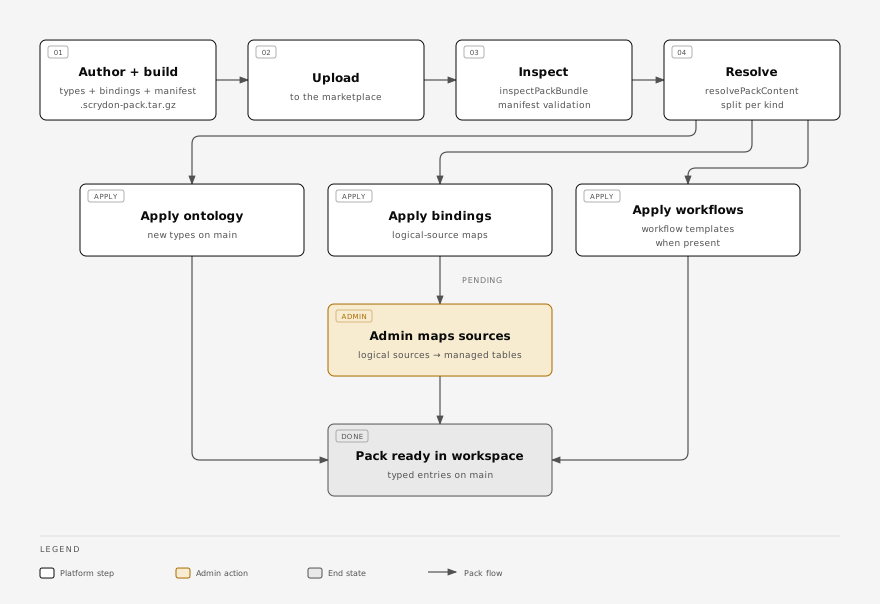
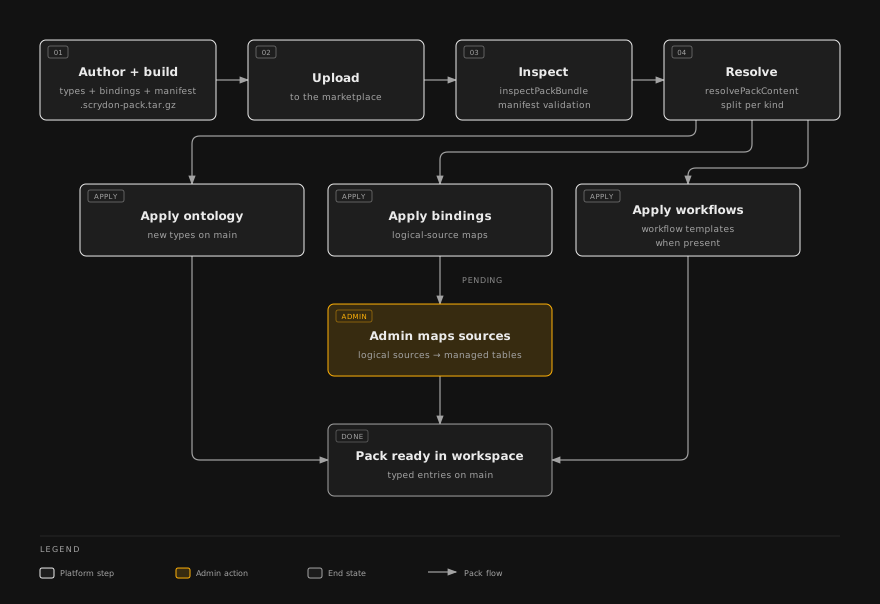
The split between Apply ontology, Apply bindings, and Apply workflows is real — each kind has its own applier inside the platform, so an extension can ship any subset (ontology-only, bindings-only, or a full vertical preset).
Related
- Branches & proposals — how extension installs and updates land on
main. - SDKs → Authoring → Ontologies — write your own.
- Examples — fully-walked-through extension examples.