Ontology
The typed semantic layer that sits on top of your managed tables and knowledge base — Objects, Links, Actions, and the workbench that authors them.
The ontology layer is Scrydon's typed semantic backbone. It takes raw data (managed tables, knowledge-base pages, process-flow tasks) and gives agents, the graph view, and the analyst a stable, typed, governed view of the world.
Instead of "a row in the regulated_entities table", a workflow reasons about "a RegulatedEntity with a legalName, a riskClassification, and links to its affiliatedPersons". The platform projects the typed Object from the underlying row at read time — no batch ETL, no copy.
Core concepts
| Concept | What it is |
|---|---|
| Object type | A typed entity (Transaction, Customer, RegulatedEntity). Has properties, identity rules, optional title / icon. |
| Link type | A typed relationship between two Object types (Customer → owns → Account). |
| Action type | A typed server-side mutation gated by the policy decision point (AssignAsset, FileSAR). |
| Binding | "How to build a typed Object from a real source" — a managed-table row, a knowledge-base page, a process-flow task. |
| Pack | A reusable bundle of object types, link types, action types, and bindings, delivered as an extension. |
| Branch | The schema is versioned. main is read-only; edits go through proposals. |
Where it sits
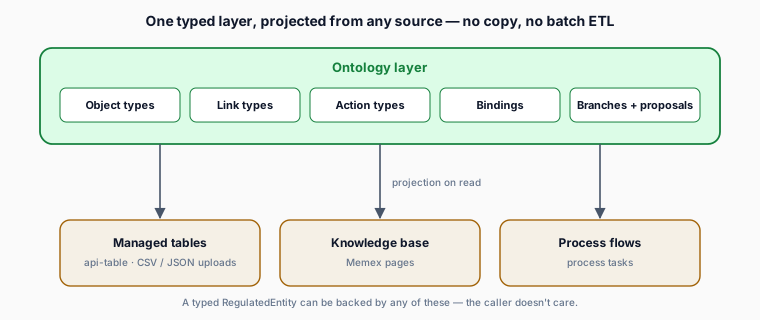
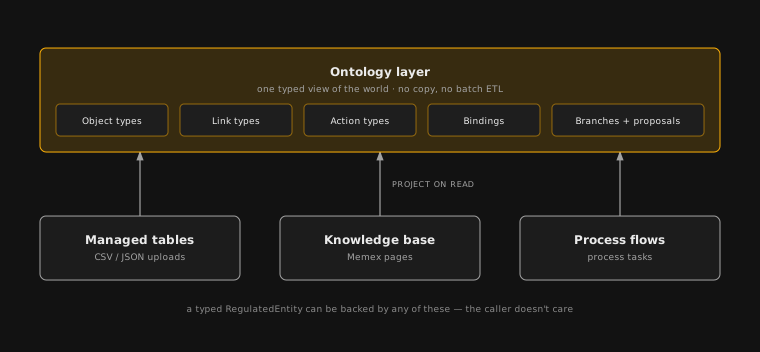
A typed RegulatedEntity instance can be backed by any of these — at the type level, the caller doesn't care.
Where you read from
| Caller | Entrypoint |
|---|---|
| Workflow agents | The Get Object block + the scrydon:ontology tools |
| Graph view | /graph — renders the schema graph |
| Analyst | /analyst — natural-language queries over typed Objects |
| Retrieval-augmented agents | The context engine — semantic search over typed instances |
All four go through the same projection path, so column masking, row filters, and DLP labels apply uniformly.
Read a versioned schema from a service
Server-side, workspace-scoped services can use @scrydon/ontology-sdk/client to read the
published ontology schema through strict runtime-validated responses. The client exposes
separate types, linkTypes, and actionTypes namespaces; every response identifies the
resolved revision and branch.
import {
  createKernelClient,
  OntologyApiError,
} from "@scrydon/ontology-sdk/client";

const ontology = createKernelClient({
  baseUrl: `${ontologyServiceUrl}/api/ontology`,
  headers: () => ({
    ...admittedCallerHeaders(),
    "x-organization-id": organizationId,
    "x-workspace-id": workspaceId,
    "x-workspace-environment-id": workspaceEnvironmentId,
  }),
});

try {
  const current = await ontology.types.list({ ontology: "crm" });
  const owns = await ontology.linkTypes.get({
    ontology: "crm",
    name: "Owns",
    revisionId: current.revision.revisionId,
  });
  const actions = await ontology.actionTypes.list({
    ontology: "crm",
    revisionId: current.revision.revisionId,
  });
} catch (error) {
  if (error instanceof OntologyApiError) {
    console.error(error.code, error.httpStatus, error.details);
  }
  throw error;
}
Omit revisionId to resolve the current published pointer once. Pass the returned
revision.revisionId to pin later reads to that immutable schema revision. The synchronous
headers callback runs for every request and must return the full tenant tuple plus the admitted
caller transport for the current request;
never ship service credentials or cached user headers to browser code. Failed requests throw
OntologyApiError, whose HTTP status is available as httpStatus. A non-2xx answer that carries no
kernel error envelope — a proxy's HTML 502, an empty 401 from the mesh — is also an
OntologyApiError: its code is MALFORMED_ERROR_RESPONSE, httpStatus is the status that was
returned, and details holds the response content type plus a bounded body preview.
Read objects and links from a service
The same client exposes strict objects and links namespaces. Callers use one contract whether a
type is stored in Scrydon's ledger or projected from a governed binding; each result's origin
states which plane supplied it. Ledger results include origin.kind === 'ledger', a marking, and a
ledger sequence. Projected results include origin.kind === 'source', the binding and version, the
source reference, and materialization metadata. A schema revision on a source result identifies the
schema used to interpret the row—it is not a historical snapshot of the upstream table.
const assets = await ontology.objects.query({
  ontology: "crm",
  objectTypes: ["Asset"],
  filter: [{ property: "status", op: "eq", value: "active" }],
  limit: 50,
});

const neighborhood = await ontology.objects.neighbors({
  ontologyApiName: "crm",
  objectType: "Asset",
  objectId: assets.sets[0].objects[0].objectId,
  depth: 1,
  limit: 25,
});

const relationships = await ontology.links.list({
  ontologyApiName: "crm",
  linkType: "Owns",
  sourceRef: neighborhood.center.objectId,
});
objects.list and links.list return signed opaque cursors; send a returned cursor back unchanged.
objects.query accepts at most 20 object types, eight filters, and 200 rows per result set.
objects.neighbors bounds traversal to depth 3 and 100 neighbors. Source-backed reads fail closed
when source authorization or transport is unavailable, and historical/as-of reads are available
only for ledger-owned objects.
Search governed object instances
search.query combines a bounded natural-language-to-filter translation with lexical matching over
the same governed source rows. Select an ontology when you know it; objectTypes can narrow the
corpus further without widening the caller's authorized schema view.
const result = await ontology.search.query({
  target: {
    kind: "ontology-instances",
    ontology: "operations",
    objectTypes: ["Aircraft"],
  },
  query: "aircraft operating in Belgium",
  limit: 25,
});
Each row reports whether it matched the ontology DSL, the lexical scorer, or both. When translation
is unavailable, query.degraded is true and the lexical path still runs. Inspect poolCapped
before treating counts or aggregates as exhaustive, and surface every entry in reasons: a link
constraint that cannot be evaluated is declared there rather than silently ignored. Search uses
current source rows, carries the caller's admitted identity and clearance, and fails closed when
source authorization or transport is unavailable. Do not send a user ID in the body.
Project governed geo layers
geo.layers turns current, source-backed object rows into map-ready features without making the
caller traverse bindings or guess coordinate columns. Scope the request to one ontology when you
know it, and use an inclusive bounding box to keep only feature anchors inside an area.
const aircraft = await ontology.geo.layers({
  ontology: "operations",
  objectTypes: ["Aircraft"],
  limit: 200,
  bbox: {
    minLng: 2.5,
    minLat: 49.4,
    maxLng: 6.4,
    maxLat: 51.6,
  },
});
Each layer contains a type name, display label, and coordinate features. A feature may also carry a polyline when the bound row supplies a supported path property. Explicitly requested empty and not-provisioned layers remain in the response so callers can distinguish “no matching rows” from a missing backing table. The query accepts at most 20 type names and 1,000 features per layer; broad all-ontology requests fail instead of returning a silently truncated map. Geo projection is a current source read and fails closed when source authorization or transport is unavailable.
Object queries follow the same rule: an unavailable source returns
SOURCE_READ_UNAVAILABLE, never substitute rows from the assertion ledger.
Watch evaluation fails unavailable instead of treating that outage as an empty
result or using stale substitute evidence to create a detection.
Human reads through managed-table bindings also carry the reader's explicit table restrictions: a table-wide deny returns no rows, and a hidden or masked column is hidden or masked, as a direct read of that table would be. Ontology access grants the read; a table grant is neither required nor propagated, so organization-scoped and workspace-scoped source tables are read the same way. Publishing or sharing an app does not grant access to its source tables. An unavailable source policy fails the ontology read; it never returns unmasked substitute data.
A feature of a tracked object may also carry two optional objects. Read them when present and never assume them:
| Field | Shape | Meaning |
|---|---|---|
track | { headingDeg?, speedMps?, observedAt? }, at least one field | Course over ground in degrees clockwise from true north, [0, 360); speed over ground in metres per second, >= 0; and the ISO-8601 time the fix was observed at source, not the time it was retrieved. |
sensor | { azimuthDeg, fieldOfViewDeg, rangeMeters } | The sector a sensor on the object covers: centre bearing [0, 360), full angular width (0, 360], and range > 0 metres. |
The projection fills both from the object's property names. Name a property after its unit and the map reads it; a property whose unit cannot be told from its name is left alone.
| Produces | Property names, first match wins |
|---|---|
track.headingDeg | courseOverGroundDeg, courseOverGround, courseDeg, course, cogDeg, cog, then headingDeg, heading, trueHeadingDeg, trueHeading — degrees clockwise from true north |
track.speedMps | speedMps as is; speedOverGroundKnots, groundSpeedKnots, speedKnots, sogKnots, sog from knots (× 1852 / 3600); speedKmh, speedKph from km/h (÷ 3.6) |
track.observedAt | observedAt, seenAt, timestamp, time, dateUtc, sentAt — re-emitted as ISO-8601 UTC |
sensor | sensorAzimuthDeg with sensorFieldOfViewDeg (or sensorFovDeg) and sensorRangeMeters (or sensorRangeM) — all three, or no sensor |
A bare speed is never read, because nothing says whether it is knots, km/h or something else
entirely. What 360 means depends on the property. AIS fields follow ITU-R M.1371, where a course
of 360 and a true heading of 511 mean "not available": courseOverGroundDeg, courseOverGround,
courseDeg, course, cogDeg, cog, trueHeadingDeg and trueHeading must lie in [0, 360),
and a 360 there gives no heading. headingDeg, heading (where ADS-B track is stored) and
sensorAzimuthDeg accept [0, 360], where 360 is north. An AIS speed over ground of 102.3 kn
in speedOverGroundKnots, sogKnots or sog is the "not available" code and gives no speed. A
bearing outside its range is dropped rather than wrapped into range, and the next property in the
list is tried. A negative speed or an unparseable time is dropped the same way. The original properties stay on the feature in their source units.
Where to start
Object types, link types, action types, bindings — explained in detail.
How a typed Object is projected from a real source.
The schema is versioned. Edits go through review.
Reusable ontology bundles delivered as extensions.
The Get Object block and the ontology tools.
Author your own ontology pack with TypeScript and Zod.
How a tenant gets an ontology
Three paths, all coexisting:
- Installed with the workspace environment. The platform ships a default ontology, installed automatically when a workspace environment is created — so it is already there the first time you open the workbench. The platform then checks and repairs that automatically, so an environment created while the ontology service was briefly unavailable still receives it.
- Install from Extensions. Pick any pack your org is licensed for. Creates object types, link types, action types, identity rules, and bindings on a fresh
mainbranch. - User-authored. Add object / link / action types directly through the Schema tab, then bind them through Bindings.
Related
- Architecture → Ontology — system-level diagram and the five-layer model.
- Analytics — the managed tables ontology binds to.
- SDKs → Authoring → Ontologies — write your own packs.