Analytics
Drop a CSV, get a typed governed managed table — classified, masked, queryable from workflows, notebooks, and the ontology layer.
Scrydon Analytics is the catalog + warehouse + governance layer that lets any team ingest, classify, and query structured data without standing up a separate data platform. Upload a file, get back a typed governed table — with row-level access, column masking, classifications, profiles, and one click to a notebook.
The mental model is Foundry-style data catalog on top of an OLAP warehouse: drop a CSV, the platform infers types, applies classifications, and exposes the table through the same authorisation and audit layer the rest of Scrydon uses.
Table lifecycle
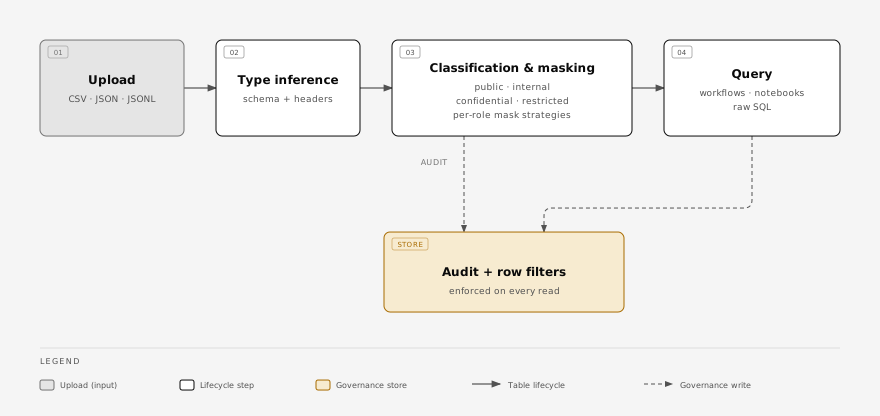
Classification and masking are enforced at every read — workflows, notebooks, and raw SQL all share the same governance path.
What you can do
| Capability | Read more |
|---|---|
| Drop a CSV / JSON / JSONL and get a typed table | Managed tables |
| Lossless preservation of dotted / non-SQL-safe headers | Column names |
| Classify columns and apply masking policies | Classification & masking |
| Query from workflows, notebooks, or raw SQL | Querying |
| Let an agent create its own tables | Agent-created tables |
| Run a Python notebook against your tables | Marimo notebooks |
The home page
When you open Analytics you land on Home — a workspace overview modelled on a data-platform landing page:
- Quick actions to create a notebook, run a query, create a table, or import data.
- Recents — your most recently updated notebooks, tables, and data sources, newest first, each linking straight to its detail view.
- Workspace stats — counts of tables, notebooks, and data sources, plus quick links to the Graph, Ontology, Extensions, and Analyst.
A brand-new workspace shows a short Getting started checklist instead of recents (connect storage → import a data source → create a notebook). Home is the default landing page for /analytics.
Data sources and environments
Data Sources, the source counts on Home, and installed-source indicators in the extension catalog use the workspace environment selected in the switcher. Sources bound to another environment, and organization catalog sources that have not been bound to an environment, do not appear as local sources.
If an environment has no sources or tables, switch to the environment where they were installed. Source details and actions also require that environment; switching workspaces does not move a source or its data.
How it relates to the rest of Scrydon
- Workflows read managed tables through the
scrydon:tablestools — get-schema, query, write, delete. - The ontology layer projects typed Objects on top of managed-table rows. Same data, but typed and traversable. See Ontology.
- Security is enforced at every read: column masking, row filters, and audit logging come for free, regardless of caller.
Where Analytics lives in the cluster
Analytics is one of the three top-level product surfaces (Platform / Agentic / Analytics), running in the scrydon-analytics namespace. The architecture is documented at Architecture → Analytics stack.