Capabilities
Standardised runtime interfaces (LLM, STT, TTS, embedding, OCR, webhook, discovery) that vendors implement and the platform orchestrates.
Beyond tools and triggers, a vendor can expose capabilities — standardised runtime interfaces the platform knows how to orchestrate. Defined per-product via defineCapability*() helpers and declared in capabilities.runtimes.
How the platform resolves a capability
When a workflow asks for "an LLM" or "STT", the platform walks the integration registry in a fixed order. This is what lets you swap OpenAI for self-hosted vLLM without touching workflow definitions.
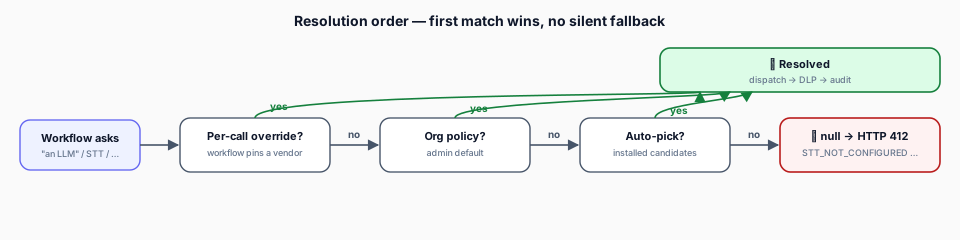
No silent fallback. If nothing matches, the call returns null and the caller surfaces a typed 412 error — never a hidden swap to a vendor the org never installed.
The capabilities
LLM
Chat, completion, streaming. The full LLM provider surface.
STT
Speech-to-text — batch + realtime WebSocket / SSE.
TTS
Text-to-speech — batch + realtime streaming.
Embedding
Vector embedding generation.
Moderation
Content-safety classification with org-policy verdicts and governance hits.
Webhook
Verify, transform, subscribe — vendor-specific webhooks.
Discovery
Selectors, resource browsing, access scopes.
| Capability | Helper | Default benchmark | Direction |
|---|---|---|---|
| LLM | defineCapabilityLLM() | MMLU · HumanEval · GPQA | higher better |
| STT | defineCapabilitySTT() | WER | lower better |
| TTS | defineCapabilityTTS() | MOS | higher better |
| Embedding | defineCapabilityEmbedding() | MTEB · MIRACL | higher better |
| Video | defineCapabilityVideo() | — | — |
| OCR | defineCapabilityOCR() | — | — |
| Moderation | defineCapabilityModeration() | — | — |
| Webhook | defineCapabilityWebhook() | n/a | — |
| Discovery | defineCapabilityDiscovery() | n/a | — |
How capabilities appear in the UI
The admin Settings → Integrations page is product-centric. Clicking a vendor opens a dialog with a Capabilities tab that groups everything into three sections:
- Intelligence Features — runtime capabilities (LLM, STT, TTS, Embedding, OCR, Video). Model counts, default-model badges, expandable model-level details.
- Event Triggers — trigger blocks that start workflows on external events.
- Capabilities and Tools — action blocks + tools, with per-row enable / disable.
Model policy (allowlist mode)
For intelligence capabilities, admins can restrict which models are usable:
| Mode | Behaviour |
|---|---|
| All (default) | Every model the vendor provides is available |
| Allowlist | Only explicitly enabled models are available |
Stored per-vendor per-capability via the org policy API. Organisation-scoped — different orgs can pick different subsets from the same vendor.
Benchmark scores
All intelligence capabilities support optional benchmarks on model definitions, shown in the integrations UI to help admins compare.
interface BenchmarkScore {
  name: string;        // e.g. "MTEB Average", "WER", "MOS"
  score: number;
  source?: string;     // e.g. "Artificial Analysis"
  updatedAt?: string;  // ISO date
}
Combining capabilities
A single product can declare multiple capabilities:
const myProduct = defineProduct({
  id: "my-ai-service",
  capabilities: {
    tools: [chatTool, imageTool],
    triggers: [],
    runtimes: {
      llm: llmCapability,
      stt: sttCapability,
      tts: ttsCapability,
      embedding: embeddingCapability,
    },
    webhooks: webhookCapability,
    discovery: discoveryCapability,
  },
  block: myBlock,
});
Capabilities in runtimes register in the platform's capability index automatically. No manual registration step.
Realtime sessions
STT and TTS support realtime streaming via WebSocket or SSE. Sessions run inside the SandboxActor's Worker Thread, which holds the persistent vendor connection.
interface RealtimeSession {
  sessionId: string;
  send(chunk: ArrayBuffer | string): void;
  onMessage(handler: (data: RealtimeMessage) => void): void;
  close(): Promise<void>;
}

interface RealtimeMessage {
  type: "interim" | "final" | "audio" | "error" | "metadata";
  data: unknown;
  timestamp: number;
}