Deployment Overview
Deploy, license, and upgrade the Scrydon platform on Kubernetes
This section covers deploying, licensing, and upgrading the Scrydon platform. Scrydon runs on Kubernetes and is delivered either as a Helm chart (connected environments) or as a self-contained Zarf package (air-gapped environments).
Pick your location
Every install runs the same Helm chart. Start from the page that matches where you're deploying — each one points back at the Helm reference and adds only the environment-specific notes.
| Where | Start here |
|---|---|
| Your own data centre / self-managed cluster | On-Premise |
| Azure (AKS, full Helm control) | Azure (AKS) |
| Azure (Portal-native, one-click) | Azure Marketplace |
| European sovereign cloud (SecNumCloud) | Cloud Temple |
| No outbound internet (classified / isolated) | Air-Gapped |
AWS and GCP follow the same Helm install as On-Premise; cloud-specific guides land here as they're written.
Architecture Overview
Scrydon ships as a single Helm chart that, by default, deploys every service into one Kubernetes namespace (scrydon-platform). The chart also accepts a namespaces.* block that splits services across multiple namespaces when isolation is required.
| Service group | Default namespace | Components | Purpose |
|---|---|---|---|
| Platform | scrydon-platform | api-platform, platform UI | Authentication, authorization, platform control plane |
| Agentic | scrydon-platform (overridable via namespaces.agentic) | agentic, agentic-realtime | AI workflow engine, real-time execution coordination |
| Analytics | scrydon-platform (overridable via namespaces.analytics) | analytics, marimo-document | Data analytics UI plus compute-free notebook rendering (optional) |
| Runtime Plane | scrydon-runtimes | runtime-plane | Optional isolated-workload controller |
| Runtime workloads | scrydon-runtime-workloads | Ephemeral Agent steps, Marimo sessions, and notebook jobs | Untrusted compute; created only on execution intent |
| Cortex | scrydon-platform (overridable via namespaces.cortex) | cortex | Chat / LLM hot-path UI |
| Ontology | scrydon-platform | api-ontology | Knowledge graph + extension manifests |
| Tables | scrydon-platform | api-table | Managed Tables (OLAP backed by StarRocks) |
| Infra (bundled) | scrydon-platform (overridable via namespaces.infra) | PostgreSQL+pgvector, StarRocks, SeaweedFS, OPA | Optional in-cluster data plane — disable individually when you bring your own |
All services share a single PostgreSQL instance (bundled or BYO). Each service that needs persistence gets its own logical database: auth, events, agentic, analytics, cortex, ontology and lakekeeper, seven in all. Service-to-service communication uses Dapr with mTLS — the chart's ACL policies enforce SPIFFE-based identity. The edge is the Kubernetes Gateway API (Gateway + HTTPRoute); the default GatewayClass is traefik, and any conforming implementation works.
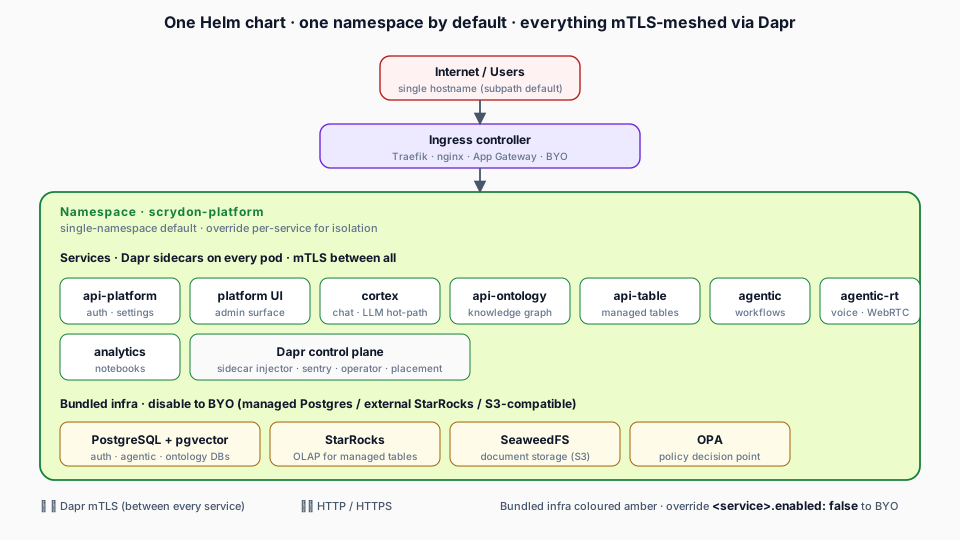
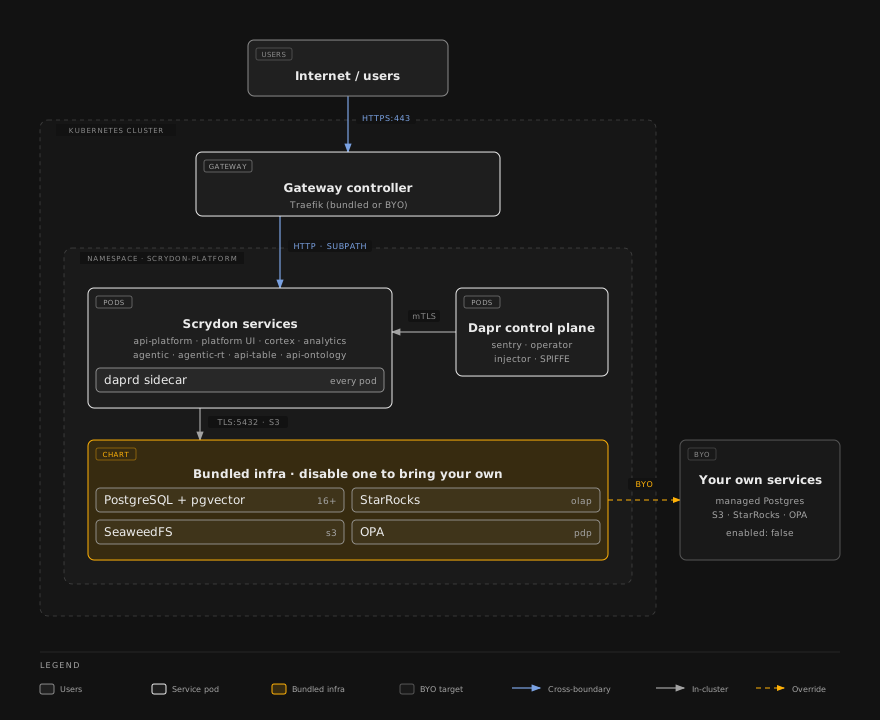
For per-namespace isolation, override namespaces.<service> — the chart auto-aligns Dapr ACL policies and the secret-reader RBAC.
What You Need Before Starting
- Kubernetes 1.28+ cluster
- PostgreSQL 16+ with the
pgvectorextension (or use the bundled in-cluster Postgres) - The Gateway API CRDs (
gateway.networking.k8s.io) and a GatewayClass — ortraefik.enabled: true, which has the chart install a Traefik release providing both - DNS records for the platform hostname (single hostname for subpath routing)
- TLS certificates (cert-manager recommended, with its Gateway API support enabled)
- A Scrydon license file (
{ jwt, publicKey }JSON) — contact sales@scrydon.com - A mail provider (SMTP by default; Resend or SendGrid also work) for transactional email — sign-up verification, invitations, and password resets
- An AI provider (OpenAI, Anthropic, Azure OpenAI, Bedrock, Mistral, or self-hosted Ollama/vLLM) to use AI features — connected after install under Settings → Platform → Extensions
See the Prerequisites page for full details including resource requirements.
Section map
Location — pick where you deploy:
Lifecycle — operate over time:
Reference — the mechanics every location builds on:
- Helm — the complete chart reference (login, namespaces, values, setup wizard, verify, and every override)
- Routing Modes — subpath vs subdomain
- TLS Certificates — Let's Encrypt, private domains, internal ACME, and corporate certificates
- TLS Offloading — behind an App Gateway / ALB / GCP LB
- BYO Database — external/managed Postgres instead of bundled
Operations — day-2 runbooks: see Operations.
Before any install, complete the Prerequisites.