Air-Gapped Deployment
Deploy Scrydon in disconnected environments using Zarf
Use this guide if your Kubernetes cluster has no outbound internet access — for example, classified government networks, isolated industrial environments, or strict compliance environments. If your cluster can reach the internet, see Helm instead.
What is Zarf?
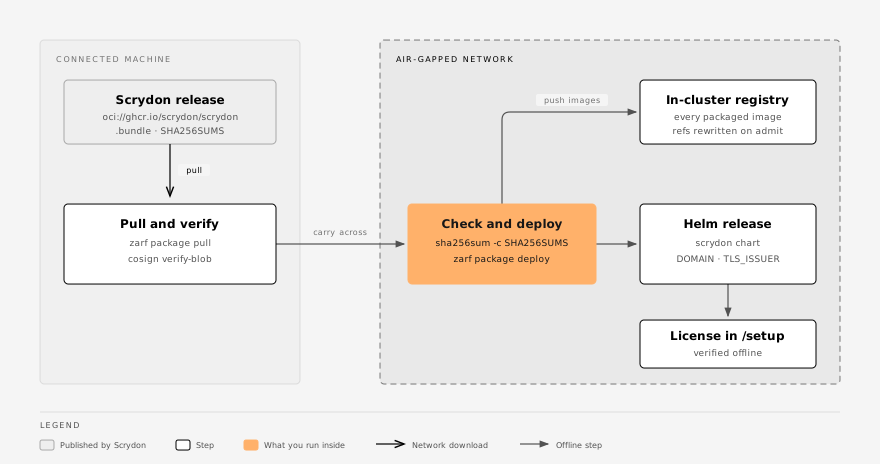
Zarf is an open-source tool (Apache 2.0) for delivering Kubernetes applications into disconnected environments. Scrydon ships every container image, the Helm chart and its values in one self-contained .tar.zst archive that you can carry across physically (USB, DVD, cross-domain guard) or over a one-way data diode.
| Capability | How Zarf handles it |
|---|---|
| Image loading | Pushes every image in the package to an in-cluster registry |
| Image reference rewriting | A mutating webhook rewrites image references — no imageRegistry override needed |
| Registry management | Zarf deploys and manages the in-cluster registry |
| SBOM | Built in (Syft, with a viewer) |
You do not need Harbor, Artifactory or any external registry. The package carries the whole stack, including the six Dapr images (five control-plane components and the injected daprd sidecar) and the Valkey image behind the event backbone.
Prerequisites
- A Kubernetes 1.28+ cluster with no outbound access.
- A Gateway API implementation. The chart's edge is a
GatewaywithHTTPRoutes, and a stock cluster has neither thegateway.networking.k8s.ioCRDs nor a controller. Install one from your own mirror before deploying, or enable the chart's bundled Traefik (traefik.enabled: true) with its images imported alongside the package. - A way to issue the front-door certificate. Let's Encrypt cannot reach an air-gapped network. Point the
TLS_ISSUERvariable at a cert-managerClusterIssuerbacked by your internal CA, or pre-create thetls-frontdoorSecret yourself — see Certificates. - The
zarfCLI — a single static binary from zarf.dev, which you carry in alongside the package. - Your license file (
{ "jwt": "…", "publicKey": "…" }), received through a secure channel. See Licensing.
Runtime isolation is packaged, not switched on. The package carries the Runtime Plane and its workload images, but the air-gap overlay keeps runtimePlane.enabled: false until your target proves a schedulable Kata/KVM RuntimeClass, internal registry and DNS reachability, workload admission, governed egress and teardown with the imported release. Packaged images alone do not prove a microVM.
Step 1: Pull and verify, on a connected machine
Signature verification needs the public Sigstore transparency log, so do it before the package crosses the gap.
# The package itself
zarf package pull oci://ghcr.io/scrydon/scrydon:<version>
# → zarf-package-scrydon-amd64-<version>.tar.zst
From the release assets (or your account team), fetch the package's signature file — the same name with .bundle appended — plus SHA256SUMS, and SHA256SUMS.asc when it is published. The release signs the package with Cosign's keyless flow; verify it against the release workflow's identity:
PKG=zarf-package-scrydon-amd64-<version>.tar.zst
cosign verify-blob "${PKG}" \
  --bundle "${PKG}.bundle" \
  --certificate-identity-regexp '^https://github.com/scrydon/main/\.github/workflows/release-platform\.yml@' \
  --certificate-oidc-issuer 'https://token.actions.githubusercontent.com'
# Verified OK
A failure means do not deploy — see Supply-chain verification.
Carry the package, SHA256SUMS and the zarf binary across the gap. The archive is a standard tar file and passes most cross-domain guard appliances.
Step 2: Check the checksum, inside
sha256sum -c SHA256SUMS --ignore-missing
# zarf-package-scrydon-amd64-<version>.tar.zst: OK
This proves the file is the one you verified on the connected side. To list every component and its license, extract the SBOM; it includes an HTML viewer:
zarf package inspect sbom zarf-package-scrydon-amd64-<version>.tar.zst --output ./sbomStep 3: Deploy
zarf package deploy zarf-package-scrydon-amd64-<version>.tar.zst --confirm \
  --set-variables DOMAIN=app.example.gov \
  --set-variables TLS_ISSUER=internal-ca
The package declares three deploy-time variables. They are the only values you can change at deploy time; everything else comes from the chart's air-gap overlay.
| Variable | Chart value | Default | Set it to |
|---|---|---|---|
DOMAIN | routing.host | app.scrydon.com | The host name users open. Always set it. |
TLS_ISSUER | gateway.tls.clusterIssuer | letsencrypt-prod | Your internal-CA ClusterIssuer. |
LICENSE_MODE | license.mode | offline | Leave it. online needs a route to license.scrydon.com. |
Zarf then:
- Creates an in-cluster OCI registry, if there is none yet.
- Pushes every image from the archive into it.
- Installs a mutating webhook that points image references at that registry.
- Runs
helm installwith the packaged chart and values. - Waits for
api-platformto roll out.
The chart runs its database bootstrap Jobs on the way — auth-bootstrap and events-bootstrap — and api-platform waits for their schema before it turns Ready. The managed Valkey password is generated on the first install and reused from its Secret on upgrades.
The guided installer runs the same deploy for you: bash setup.sh --location airgap --package <file> --host app.example.gov --tls-issuer internal-ca. It checks your license offline against the signing key pinned in the installer, runs the cluster preflight and passes DOMAIN and TLS_ISSUER to Zarf. Before deploying, it checks the package against a SHA256SUMS file in the same directory and refuses a file that does not match. Without SHA256SUMS it warns and continues, so carry it across. The checksum only proves the file is unchanged since the connected side: the signature check in Step 1 still has to happen there, because it needs the public transparency log.
Step 4: Enter the license
The license is not part of the package. Open https://<DOMAIN>/platform/setup and paste or drop your license file into Step 1 of the wizard. The wizard shows the claims, and on Step 2 the server verifies the JWT against the Scrydon signing keys built into the release before storing it in the platform database. The file's publicKey is not stored and never decides trust. There is no Kubernetes Secret to manage; later renewals go through Settings → Organization → License.
Step 5: Verify the deployment
The default layout puts every service in scrydon-platform.
kubectl get pods -n scrydon-platform           # Running, 2/2 with the Dapr sidecar
kubectl get gatewayclass                       # ACCEPTED=True for gateway.className
kubectl get gateway -n scrydon-platform        # PROGRAMMED=True
kubectl get httproute -A                       # one per enabled app
kubectl get certificate -n scrydon-platform # READY=True| Symptom | Look at |
|---|---|
Pods stay 1/1 | Dapr injection failed: kubectl get pod -A -l app=dapr-sidecar-injector. |
A pod is stuck in Init:0/1 | wait-for-db has not finished: kubectl get pod -n scrydon-platform -l app=db. |
api-platform waits in wait-for-events-schema | kubectl get job -A -l app=events-bootstrap, and the events database when you bring your own PostgreSQL. |
| The certificate never turns Ready | TLS_ISSUER names an issuer that does not exist, or still points at Let's Encrypt. |
A listener reports Accepted=False reason=PortUnavailable | gateway.listenerPorts.* does not match a port your controller listens on. Traefik binds :8000/:8443 inside the container, which is the chart default. |
Alternative: your own private registry, without Zarf
If you already run an internal registry (Harbor, Artifactory, a customer ACR), skip Zarf and install the chart directly. Import every image the chart pulls, then set both registry values:
helm install scrydon ./helm/scrydon \
  -f helm/scrydon/values.yaml \
  -f helm/scrydon/values.airgapped.yaml \
  --set global.imageRegistry=harbor.internal \
  --set dapr.global.registry=harbor.internal/dapr
global.imageRegistry covers every chart-managed image. dapr.global.registry covers the five Dapr control-plane images and the injected daprd sidecar, which come from the Dapr subchart and cannot see the parent's global. Missing the second is not a partial failure: the injector never turns Ready, or application pods cannot start their sidecar. helm install warns when only one is set.
This path also lets you set any chart value — routing, BYO database, StarRocks, scheduling, low-resource trims — and pre-seed the license with auth.secrets.LICENSE (the file's jwt field; there is no public-key value). See the Helm reference.
To list the exact images for the version you deploy:
helm template scrydon ./helm/scrydon \
  -f helm/scrydon/values.yaml -f helm/scrydon/values.airgapped.yaml \
  | grep -oE 'image: .*' | sed 's/image: //' | tr -d '"' | sort -u
A single third-party image can come from a different path with its per-image registry key (infra.starrocks.image.registry, opa.image.registry, …).
GitOps and offline manifest rendering
Anything that renders the chart with helm template instead of installing it live — ArgoCD's default renderer, Kustomize's Helm inflator, a helm template | kubectl apply pipeline across the gap — must set global.requireExplicitSecrets: true and supply the secret set from values.gitops.example.yaml.
Without a live API connection Helm's lookup returns nothing, so every chart-managed secret is regenerated on each render — including the Dapr crypto master key, which makes every secret at rest undecryptable. With the flag set, a missing value fails the render and names its values path. Details: Rendering without a live cluster.
zarf package deploy, a direct helm install and Flux's HelmRelease all run a real helm upgrade --install and need none of this.
Security considerations
- No edge credentials or callbacks. A core
RequestHeaderModifierfilter strips the Dapr and on-behalf-of identity headers from every external request, and the HTTP→HTTPS redirect is a coreRequestRedirectfilter. Both apply on every route, with no controller-specific annotation that could fail silently. - Offline licensing. License validation makes no outbound call; the JWT is verified locally against the Scrydon signing keys built into the release.
- No telemetry leaves the cluster.
- Image integrity. Verify the package signature and
SHA256SUMS, record the imported image digests, and use exactly those artifacts for Runtime Plane accreditation. Zarf's rewriting is not a substitute for keeping digest evidence. - Secrets. The license is stored in the platform database after first use; deployment credentials live in the platform's in-cluster secret stores. Zarf sends nothing out of the disconnected environment.
Next: Licensing covers offline validation, expiry and renewal.