Scrydon in an afternoon
A three-hour orientation to the whole platform: the problem it solves, the mental model, data and knowledge, ontologies, agents, governance, and where Scrydon fits among the alternatives.
This course is for anyone starting with Scrydon: a new colleague, a new user, a partner's engineer. It assumes no background in AI, data platforms or ontologies. Every term is explained the first time it appears.
It has seven modules. Each one gives you the idea in plain words, then how Scrydon does it, then where to go deeper. Read them in order: each builds on the one before. Allow about three hours, including the links you choose to follow.
Each module opens with a short narrated video (about three minutes, with captions) that covers the same ground. Watch it first for the overview, or skip it and read.
Prefer to learn by doing? Read modules 1 and 2, then do Getting Started (10 minutes), then come back for modules 3 to 7. The hands-on part makes the rest concrete.
Module 1 — The problem Scrydon solves
Most organisations now have AI. Few have changed how they work.
A chat assistant helps one person with one task: summarise this, draft that. That is useful, but the process around that person still runs on handovers, inboxes and meetings. A case sits in someone's queue for days, not because anyone is slow, but because the next person needs information from three systems and a colleague who is on leave.
For some organisations it is harder still. Banks, defence, government, healthcare and critical infrastructure share three constraints:
- Their data can't leave. It is classified, regulated or simply too important to send to someone else's cloud, so the AI tools everyone else uses can't reach it.
- Their decisions have to be explained: to a regulator, a court, a board or an after-action review. AI that can't show where an answer came from can't be used.
- Their people are stretched. Experts retire, headcount does not grow, and the work gets more complex.
Scrydon exists so that these organisations can put AI to work on their real processes, inside their own walls, with a record of every step.
Module 2 — The mental model: a new colleague
The easiest way to understand Scrydon is to think about how you bring a capable new colleague into a critical job. You don't hand them the keys on day one. You give them:
| What you give a new colleague | What Scrydon does | Where it lives in Scrydon |
|---|---|---|
| An inbox. They see the reports, alerts and requests that come in. | It sees what comes in, from the tools you already use: email, chat, documents, business systems, sensors and feeds. | Extensions, Triggers, Analytics |
| An induction. You teach them what matters here: our customers, assets, cases. | It learns your organisation: one shared understanding of what everything is and how it connects, agreed by your own people. | Ontology, knowledge bases |
| A mandate. Prepare and propose up to this limit; above it, a named person signs. | It acts within its mandate. It gathers, links and drafts. Where judgement is needed, a person decides, and nothing moves until they do. | Agents, approval steps in process flows |
| The handbook. This is how we do things here. | It follows your procedures, the same way every time, across teams, systems and days. | Workflows, process flows |
| The file. Everything they did is on record. | Every step has a name, a reason and a source. | Audit logging |
| A desk in your building. | It runs where your data is allowed to be: your premises, a European cloud, or fully disconnected. | Deployment |
The four middle rows form a loop you may meet elsewhere in these docs: Observe, Orient, Decide, Act. Scrydon observes what comes in, orients it against what your organisation knows, lets people decide where judgement is needed, and acts by running your procedure and writing the result back. Each pass through the loop leaves the organisation knowing a little more.
The applications you will see
Scrydon is one platform with a few applications on top. You switch between them from the sidebar.
| Application | What you do there |
|---|---|
| Chat | Ask questions, search your knowledge bases, run workflows, all in one conversation. See Chat. |
| Agentic | Build workflows on a visual canvas, set up automations, run process flows. See Architecture → Agentic. |
| Analytics | Turn files and sources into governed tables, query them, work in notebooks, model your organisation in the ontology. See Analytics. |
| Horizon (early access) | A live, map-based picture of an operation. See Horizon. |
| Platform | Organisation, workspaces, people, extensions, security settings. See Platform. |
Organisation and workspace are the two containers everything lives in. An organisation is the top-level boundary: nothing crosses from one organisation to another. A workspace is a team's space inside it, holding its workflows, knowledge bases and files. See Workspaces.
Module 3 — Data and knowledge
Organisations hold two kinds of information, and Scrydon treats them differently.
Structured data is rows and columns: transactions, inspections, stock levels, sensor readings. In Scrydon this becomes a managed table. You upload a file or connect a source, and Scrydon infers the columns and their types, and you classify the table and its sensitive columns so that each person sees them shown, masked or not at all. Managed tables are stored as open Apache Iceberg tables, a widely supported open table format, so other tools can read them and your data is never locked into a format only Scrydon understands. See Managed tables and Iceberg.
Unstructured content is documents: policies, reports, manuals, meeting notes, emails. In Scrydon it goes into a knowledge base.
What "knowledge" means here
Putting a file somewhere is not the same as knowing what is in it. Scrydon keeps the two apart on purpose:
- Storage answers "where is the file?" It keeps bytes you can browse and download.
- A knowledge base answers "what do we know?" Documents are added deliberately, scanned for secrets, given a clearance level, and indexed so that agents, workflows and Chat can retrieve the right passage when they need it.
Retrieval is what lets an AI answer from your documents instead of from its general training, and cite where the answer came from. The common technique is called RAG (retrieval-augmented generation): find the relevant passages first, then give them to the model with the question. Scrydon offers RAG and a second engine, Memex, which retrieves without using a model at all. See Knowledge base vs. storage and Architecture → Knowledge bases.
Rule of thumb: putting a file in storage does not make it searchable by agents. Adding it to a knowledge base does.
Module 4 — Ontologies: one shared meaning
This is the idea newcomers find most abstract, and the one that matters most.
The idea
Every organisation has the same things spread across many systems. A vessel is a row in the port system, a name in an inspection report, an ID in a sensor feed and a subject line in someone's inbox. Each system has its own column names and its own idea of what a vessel is. A person can join those up in their head. Software, and AI, cannot, unless someone writes down what a vessel is.
An ontology is that written-down agreement: the things your organisation cares about, their properties, and how they relate. A vessel has a name, a flag and an owner. An inspection is of a vessel. A finding belongs to an inspection. It is a model of your organisation, in your own words.
How Scrydon does it
| Concept | Plain meaning | Example |
|---|---|---|
| Object type | A kind of thing | Vessel, Inspection, Customer |
| Link type | How two kinds of things relate | Inspection → of → Vessel |
| Action type | Something you are allowed to do to a thing, with rules | AssignInspector, FileReport |
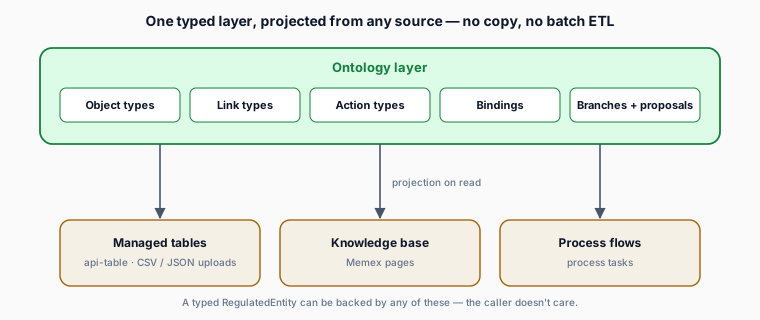
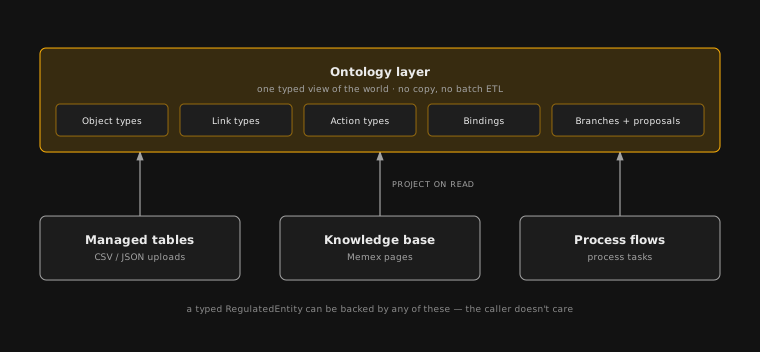
| Binding | Where a thing's data really comes from | "A Vessel is a row in the port_register table" |
| Branch and proposal | Changes are drafted, reviewed and published, like a document | "Add Vessel.riskScore: proposed by Anna, approved by Tom" |
Two properties make Scrydon's ontology practical:
- No copying. A binding tells Scrydon how to build a typed
Vesselfrom the real source when it is read. There is no second copy to keep in sync, and the same permissions, masking and clearance rules apply on the way through. - Your people decide. When a new source arrives, AI can suggest how its fields map onto what the organisation already knows. The suggestion changes nothing until a person reviews it, and whoever authors a change can't approve it themselves: a different reviewer decides. Every version is kept.
Why it is worth the effort
The ontology is the honest cost of Scrydon: your organisation has to agree on what things mean. That takes real conversations between the people who own the data. The payoff is that the agreement is reusable. The first process you automate defines Vessel and Inspection; the second process starts with them already defined, so it costs a fraction of the first. And agents that reason about "a vessel with three open findings" make far fewer mistakes than agents guessing at column names.
Go deeper: Ontology, Concepts, Branches & proposals.
Module 5 — Agents, and what "agentic" means
The idea
A language model on its own only produces text. An agent is a language model that can also use tools: search a knowledge base, look up a record, send a message, call a system. Give it a task and it decides which tools to use, looks at the results, and continues until the task is done. That ability to take steps, not just answer, is what "agentic" means.
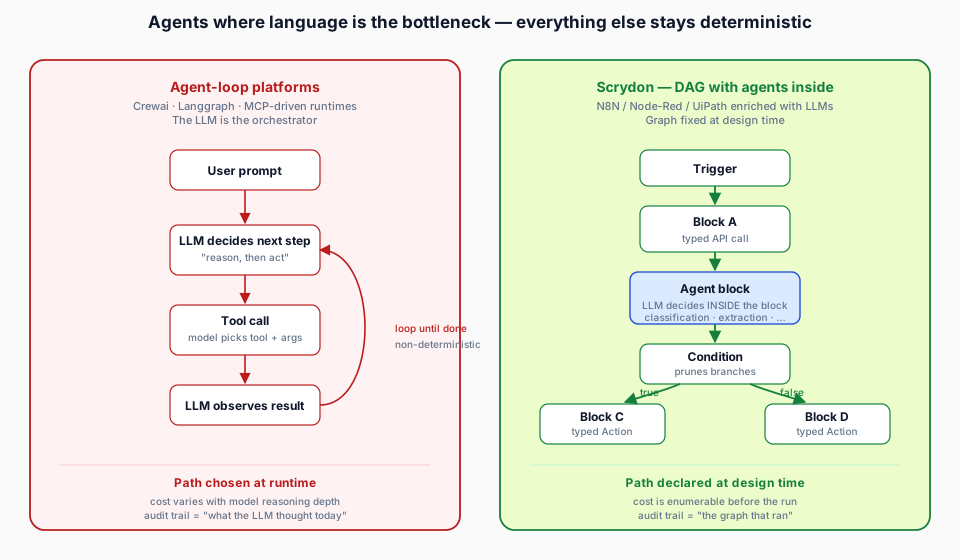
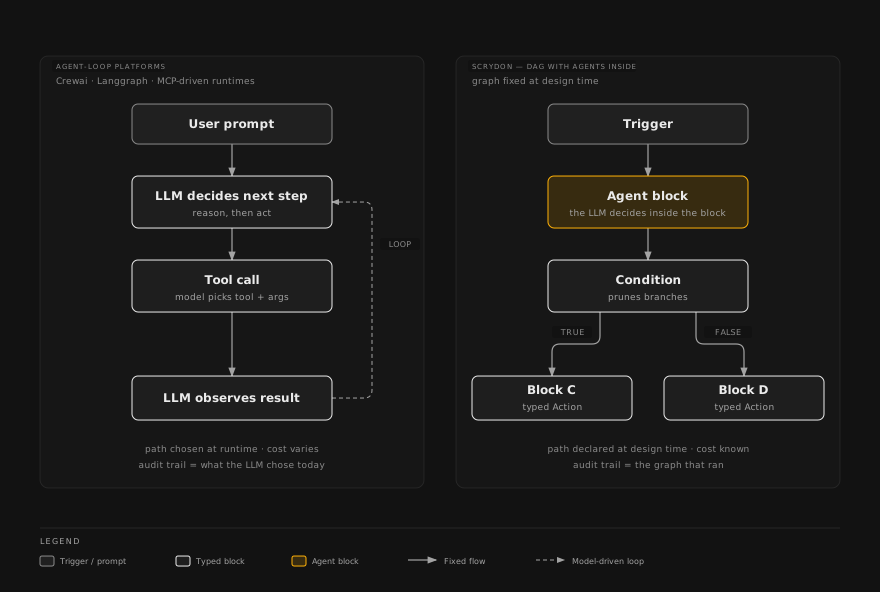
There are two ways to build with agents:
- The agent drives. The model decides every next step, in a loop. Flexible and good for exploration, but the path can differ from one run to the next, which makes it hard to predict, cost and audit.
- The process drives, and agents do the language work inside it. The steps are fixed when the process is designed. An agent is one step among others, used where reading, writing, classifying or extracting is needed.
How Scrydon does it
Scrydon is deterministic by default and agentic where it earns its place:
- A workflow is a fixed graph of steps (called blocks) on a canvas. The same input runs the same steps in the same order, so a run can be explained from its trace. An Agent block is where the model works; typed Condition and Router blocks decide which branch runs next.
- An automation is a single agent with a prompt, a set of tools and a trigger, for jobs where letting the agent choose its steps is the right call. See Automations.
- A process flow carries a case across stages, people and days: a request comes in, work is prepared, a person approves, the result is written back. This is where "a named person decides" is built in. See Process flows.
- Chat is the conversational way in: it can search knowledge, query ontology data and run workflows from a single thread. See Chat.
Every tool an agent can call is typed: its inputs and outputs are declared in advance and checked on both sides, so the set of things a workflow can do can be listed before it runs. And each agent step is reported to a guardian that can allow, deny, modify or pause it, with every decision chained into a tamper-evident record. See Why deterministic and Agent Control Standard.
Where the models come from
Scrydon does not ship one fixed AI model. Models, like every other outside system, arrive through extensions: installable add-ons that bring models, tools and connections to your systems. Your organisation chooses which to install, including self-hosted models that run entirely inside your own infrastructure. See Extensions and OpenAI-compatible and self-hosted models.
Module 6 — Governance, and where Scrydon runs
For the organisations Scrydon is built for, where the software runs and what it is allowed to do matter as much as what it does.
Where it runs
Scrydon is installed in your own Kubernetes cluster: on your premises, on a European sovereign cloud, or fully air-gapped with no internet connection at all. Your data stays in that cluster. The only traffic Scrydon itself requires is a daily licence check that carries no customer data. Outside AI providers and business systems are reached only if you install an extension for them.
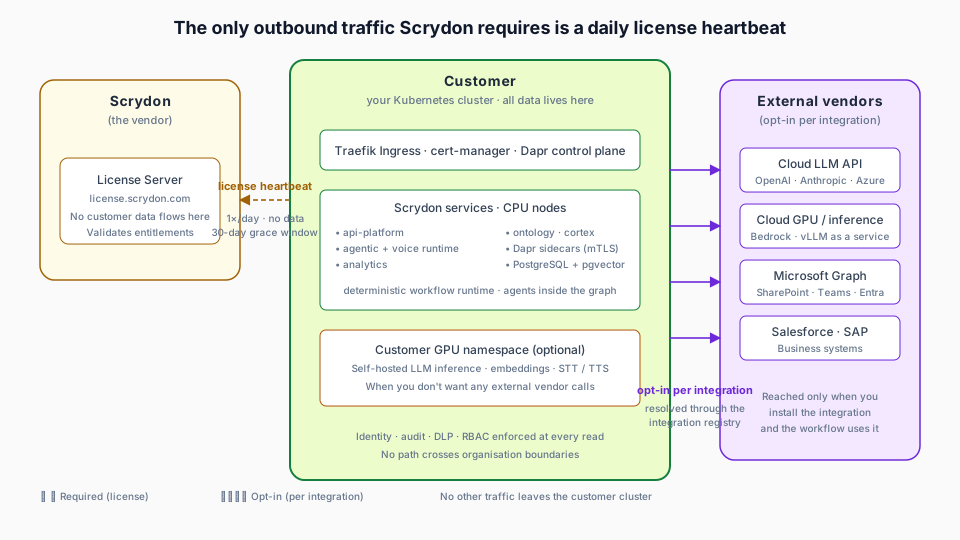
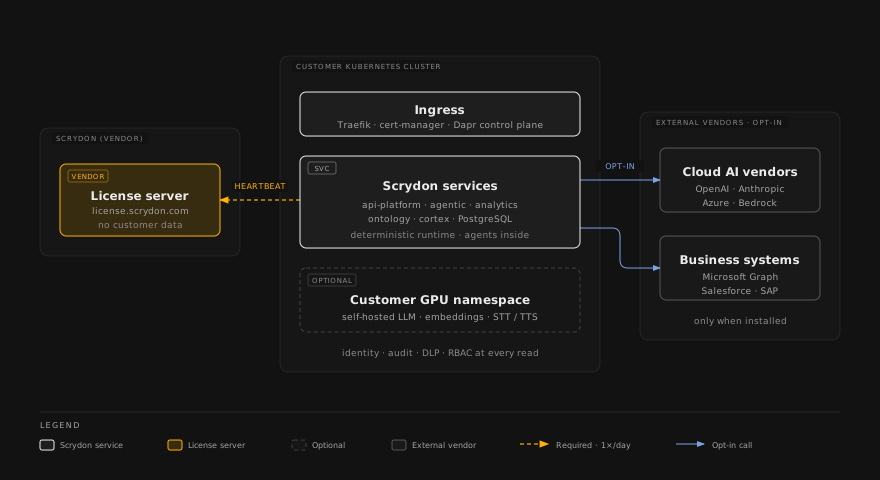
See Architecture and Air-gapped deployment.
What it is allowed to do
| Control | The question it answers | Read more |
|---|---|---|
| Permissions | Who can see and change what, per organisation, workspace and team | Permission model |
| Classification and masking | Which columns are sensitive, and who sees them unmasked | Classification & masking |
| Clearance | Which documents each person may read, by classification level | Knowledge base clearance |
| Data-loss prevention (DLP) | Is sensitive data about to reach a model or leave the organisation? | DLP |
| Authorisation of runs | May this workflow do this, right now, for this person? | Authorization |
| The record | What ran, who started it, what it touched, and why | Audit logging |
Scrydon does not make an organisation compliant; compliance belongs to the organisation. What it does is produce the evidence as the work happens, mapped to the frameworks regulated organisations answer to. See Compliance.
Module 7 — Where Scrydon fits among the alternatives
An organisation that wants AI working on its processes has several options, and each is the right answer for someone. Knowing them helps you explain what Scrydon is, and what it is not.
| Option | What it is good at | What it leaves to you |
|---|---|---|
| AI assistants and copilots | Making individuals faster, quickly | The process around the individual is unchanged. Nothing acts across systems, teams or days. |
| Building on a public cloud's AI and data services | Familiar tools, broad services | Joining five or six services together, and keeping governance consistent across every seam. The services run where the cloud provider runs them. |
| Data and analytics platforms (lakehouses, warehouses) | Storing, processing and analysing large volumes of data | Running processes, involving people in decisions, and a model of the organisation that your own people declare. |
| Established ontology and decision platforms | Mature capability, fast first results | Often a large commitment up front, and dependence on the vendor's own engineers to build and run it. |
| Workflow automation tools | Automating one well-defined task | A shared model of the organisation, and governance, which you add yourself. |
| Assembling open-source components | Control and low licence cost | You become the platform vendor: identity, policy, audit and security across every component are yours to build and keep current. |
Where Scrydon sits: one platform that brings the data layer, the shared model of your organisation, knowledge, agents and processes together under one identity model, one policy layer and one record, operated by you, inside your perimeter. You can leave with everything: your tables are open Iceberg tables, and your ontology and procedures are definitions you keep.
What Scrydon does not replace: your systems of record (ERP, CRM, case management) stay where they are, and Scrydon reads from and writes back to them. Your identity provider stays in charge of who your people are. Your BI and reporting tools can keep reporting. And Scrydon uses AI models rather than making them.
The honest cost: module 4's agreement on what things mean. It is real work, and it is also why the second process is cheaper than the first.
Words to know
The ten terms you will meet most. The full list is in the Glossary.
| Term | Meaning |
|---|---|
| Organisation / workspace | The tenant boundary, and a team's space inside it |
| Extension | Anything you add to Scrydon: models, tools, connections to your systems, ontologies, process flows |
| Managed table | A typed, governed table of structured data, stored as an open Iceberg table |
| Knowledge base | Documents made retrievable for agents, with clearance per document |
| Ontology | The agreed model of your organisation: object, link and action types |
| Binding | Where an ontology object's data really comes from |
| Agent | A model that can use tools to complete a task |
| Workflow | A fixed graph of blocks, with agents as blocks inside it |
| Process flow | A procedure that carries a case across stages, people and days |
| Run | One execution of a workflow or automation, with its own record |
Check yourself
Try to answer each question before opening it.
Why doesn't uploading a file to storage let an agent answer questions about it?
Storage keeps bytes; it has no index. A file becomes retrievable when it is added to a knowledge base, where it is scanned, given a clearance level and indexed.
What is the difference between a managed table and an ontology object type?
A managed table is where structured data is stored. An object type is the organisation's agreed definition of a kind of thing. A binding connects the two: it says how to build a typed object from rows in the table, when it is read, without copying.
In a Scrydon workflow, who decides which step runs next: the model or the workflow?
The workflow. The graph is fixed at design time and typed Condition and Router blocks choose branches. The model does language work inside Agent blocks. For jobs where the agent should choose its own steps, use an automation.
An analyst proposes a new property on an object type. What happens before other workflows see it?
The change sits on a proposal branch until someone else reviews and publishes it. Its author can't approve it, even as an administrator; a different eligible reviewer decides. Every published version is kept.
What leaves the customer's cluster in a standard installation with no extensions for outside services?
Only the daily licence check, which carries no customer data. An air-gapped installation verifies its licence offline.
What is the main thing an organisation has to invest in to get value from Scrydon?
Agreeing on what things mean: defining its ontology with the people who own the data. That agreement is what makes each following process cheaper.