Agent
Create powerful AI agents using any LLM provider
The Agent block serves as the interface between your workflow and Large Language Models (LLMs). It executes inference requests against various AI providers, processes natural language inputs according to defined instructions, and generates structured or unstructured outputs for downstream consumption.
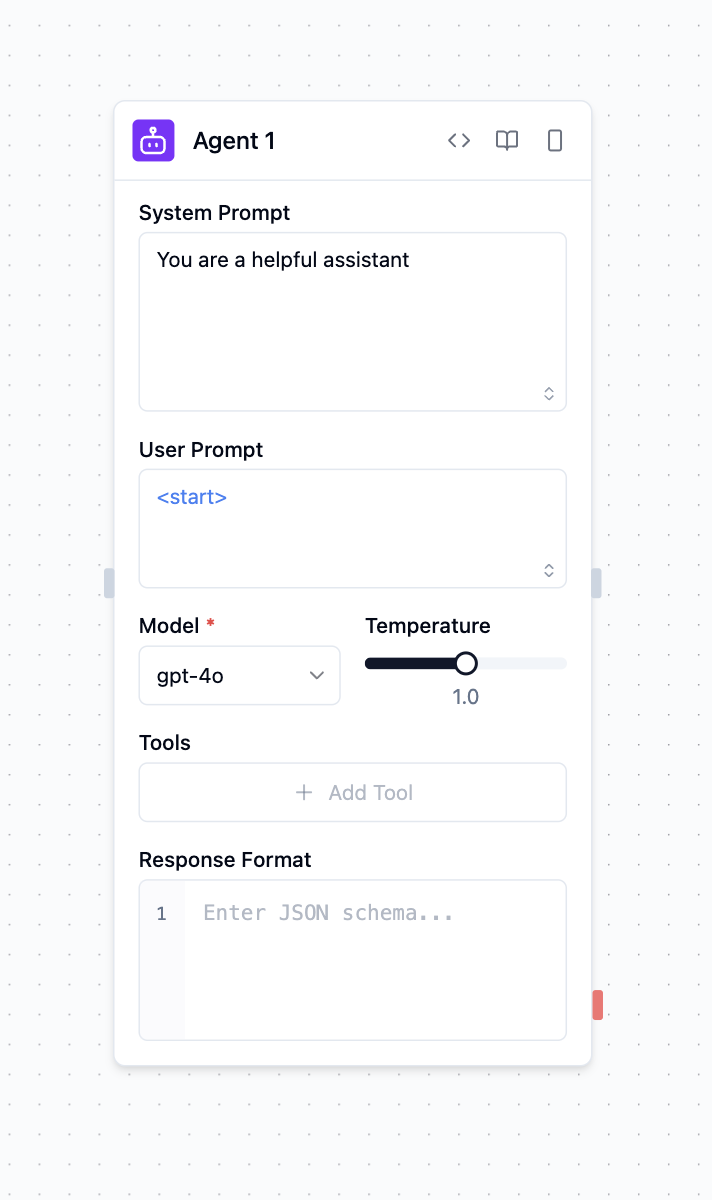
Overview
The Agent block enables you to:
Process natural language: Analyze user input and generate contextual responses
Execute AI-powered tasks: Perform content analysis, generation, and decision-making
Call external tools: Access APIs, databases, and services during processing
Generate structured output: Return JSON data that matches your schema requirements
Configuration Options
System Prompt
The system prompt establishes the agent's operational parameters and behavioral constraints. This configuration defines the agent's role, response methodology, and processing boundaries for all incoming requests.
You are a helpful assistant that specializes in financial analysis.
Always provide clear explanations and cite sources when possible.
When responding to questions about investments, include risk disclaimers.
The Agent also tells the model today's date. It adds one line, Current date: YYYY-MM-DD (UTC)., after your system prompt and before the conversation. The date is set when the run starts and stays the same for the whole run. Without it, a model assumes the year its training data ends and searches for "latest … 2024".
User Prompt
The user prompt represents the primary input data for inference processing. This parameter accepts natural language text or structured data that the agent will analyze and respond to. Input sources include:
- Static Configuration: Direct text input specified in the block configuration
- Dynamic Input: Data passed from upstream blocks through connection interfaces
- Runtime Generation: Programmatically generated content during workflow execution
Goal
Use the optional Goal field when the Agent should achieve an outcome rather than answer a single prompt. The goal is added to the normal Agent conversation; the same Agent block still owns model selection, memory, structured output, and platform tools. Its built-in shell and file tools run inside the isolated turn, so a goal can ask the Agent to clone a repository, install dependencies, run a build, and report only results it actually observed.
Model Selection
The Agent block doesn't reference a vendor by name. It declares a need for the LLM capability and the platform's integration registry resolves the request against installed providers — first by per-call override, then by org policy, then by automatic pick across installed vendors.
Vendors that contribute the LLM capability today:
- Anthropic — Claude family via the Messages API
- OpenAI — GPT family via
openai-chat-v1 - Mistral — Mistral models via
openai-chat-v1 - AWS Bedrock — foundation models via
bedrock-converse-v1 - Azure AI Foundry — per-org deployed models
- Google Cloud (Vertex AI) — Gemini via
openai-chat-v1 - Ollama — local LLMs via OpenAI-compatible endpoint
- vLLM — self-hosted high-throughput inference
Temperature
Control the creativity and randomness of responses:
More deterministic, focused responses. Best for factual tasks, customer support, and situations where accuracy is critical.
Balanced creativity and focus. Suitable for general purpose applications that require both accuracy and some creativity.
More creative, varied responses. Ideal for creative writing, brainstorming, and generating diverse ideas.
The temperature range (0-1 or 0-2) varies depending on the selected model.
Model
Choose Default to use the model configured under Settings → Platform → Defaults, or select a model to override it for this workflow. Default stores no model value. The Agent block has no connection or credential selector: the platform automatically resolves an eligible connection for the active environment on every model turn.
API keys and OAuth account identifiers never live in the Agent block or execution payload. LLM API boundaries reject caller-supplied credential fields instead of dispatching with them.
On either execution-fabric path, the Agent runner receives only execution-scoped grants. The callback forwards the credential-free turn to api-platform; credentials and provider dispatch remain outside Agentic and outside the runner. The execution trace records whether this invocation was bound to microvm or the explicitly weaker managed_process tier.
Messages
A new Agent starts with a System message for its overall behavior, rules, and context. Every newly added message also defaults to System. Use the role selector and its help text to switch a message to User (the request or input) or Assistant (an earlier response supplied as conversation context). Adding or reordering messages does not change existing roles. The prompt generator applies to the message you most recently focused.
Tools
Tools extend the agent's capabilities through function calling. Tools come from vendor products — never from a flat global pool. When you click "Add tools" on the Agent block you pick from the installed vendor catalog: each product contributes its own toolset (e.g. google:gmail contributes send-mail, list-messages, …; scrydon:knowledge contributes knowledge-rag-search).
Executable blocks in the workflow's Core category also appear automatically under Blocks: A2A, API, Create Process Instance, Function, Knowledge, Memory, Search (web search), SFTP, SSH, Storage, Table Write, Translate, and Workflow. Create Process Task is temporarily hidden from new authoring while existing saved workflows remain loadable. Recursive and special-purpose blocks (Agent, Evaluator, Router, and Workflow Input) are intentionally omitted. MCP tools remain available through their dedicated server entries.
An Agent with no tools selected, or with only the Search block, gets no built-in Scrydon actions. Once you select any other enabled tool, the Agent also receives the built-in Scrydon actions, and among them exactly one built-in web-search tool. It searches with your organization's default web-search extension. It is left out in two cases:
- You added the Search block. The block is then the Agent's built-in web-search tool.
- You added a tool from a web-search extension, for example Tavily. That tool covers web search instead.
The built-in web-search tool takes an optional recency of day, week, month, or year, and each result carries a publishedDate when the provider supplies one. The tool's description tells the model to use recency for time-sensitive questions instead of putting a year in the query.
A web-search extension that contributes no Agent tool leaves the built-in one in place. If you explicitly select both the Search block and a web-search extension's tool, the Agent keeps both, because both were chosen.
An Agent also receives five sandbox tools automatically: run_shell, read_file, write_file, list_dir, and publish_file. An Agent block that declares no enabled tools gets only publish_file; the other four are neither offered to the model nor run if the model names one anyway. The sandbox tools execute inside the bound Agent runner, share one ephemeral /workdir for the duration of that turn, and return observed output to the model. The image includes common development utilities such as Git, curl, grep/ripgrep, Python with pip, jq, archive tools, native build tooling (make, gcc/g++), and Bun as a Node-compatible JavaScript/TypeScript runtime and package manager (bun install, bun run, bunx; node, npm and npx are aliases onto it). Package registries (PyPI, npm) are reachable by default, so an Agent can install what a task needs.
Getting files back out
The sandbox is deleted when the turn ends, so a file an Agent generates does not survive on its own. publish_file is how it hands one back: the Agent names a file it wrote, the platform stores it against that execution, and the Agent receives a URL it can include in its answer. Published files also appear on the block's files output, alongside files from any other source. They are listed in a Files section on the block's console entry, where an image, audio clip or video plays in place and anything else is a download link.
Use it for anything generated — a chart, a rendered image, an audio clip, a report. Ask for it in the prompt ("save the chart and publish it") when you want to be sure.
Files are stored against the workspace and execution that produced them, so the same people who can see that run can open them. The Agent never holds storage credentials — the bytes travel over a governed channel and the platform performs the write.
Publishing has its own budget, separate from the Agent's other platform calls, so a large artifact cannot starve its model and tool calls. Files up to 5 MB are published in a single request. Larger ones, up to 56 MB, are uploaded in chunks; that path needs cloud object storage, so a deployment using local disk storage keeps the 5 MB limit.
Published files are generated by a model and are served as downloads rather than rendered in place, except for ordinary images, audio and video. A generated .html or .svg will download rather than open — that is deliberate, because rendering model-authored markup in the browser would let it act with your session.
Network access remains governed by your organization's IT egress policy. Workflow authors cannot widen that policy from an Agent block. Installing a CLI does not grant it unrestricted network access, and the workspace is discarded after the turn.
Provider and standard tool credentials stay server-side. Credential-free tools can use an isolated runner when their dispatcher supports it; credential-bearing vendor/custom tools refuse when isolation is required until they have a brokered, execution-scoped credential contract. Agent-configured MCP tools also refuse before discovery or network I/O when isolation is required. Only the standalone workflow activity for an exact administrator-allowlisted, credential-free HTTPS MCP server has a runtime-plane route today. The trace's selected isolation tier is the proof for a particular execution.
Tool integration process:
- Open the Tools section on the Agent block
- Pick a vendor product from the installed catalog
- Add one or more of the product's tools and (where required) configure a credential
Where tools come from:
- Built-in: see
scrydon— Knowledge, Memory, Storage, Tables, Workflow, Web, SMTP, SMS, Guardrails, A2A, SSH - Productivity & storage: Google, Microsoft, Atlassian, GitHub, Salesforce, …
- Custom: build your own with the Integrations Authoring SDK and upload through Settings
Tool Execution Control:
- Auto: Model determines tool invocation based on context and necessity
- Required: Tool must be called during every inference request
- None: Tool definition available but excluded from model context
Response Format
The Response Format parameter drives structured output generation through JSON Schema validation, producing consistent, machine-readable responses that conform to predefined data structures.
When a Response Format is set, the runtime instructs the model to emit JSON matching your schema, tolerantly extracts the JSON from the reply (including markdown-fenced output), and — if the first reply doesn't parse — makes one automatic corrective attempt. If the model still cannot produce conforming JSON, the agent's text answer is preserved and surfaced rather than discarded, so a response is never silently lost.
{
  "name": "user_analysis",
  "schema": {
    "type": "object",
    "properties": {
      "sentiment": {
        "type": "string",
        "enum": ["positive", "negative", "neutral"]
      },
      "confidence": {
        "type": "number",
        "minimum": 0,
        "maximum": 1
      }
    },
    "required": ["sentiment", "confidence"]
  }
}
This configuration constrains the model's output to comply with the specified schema, preventing free-form text responses and ensuring structured data generation.
Accessing Results
After an agent completes, you can access its outputs:
<agent.content>: The agent's response text or structured data<agent.tokens>: Token usage statistics (prompt, completion, total)<agent.tool_calls>: Details of any tools the agent used during execution<agent.cost>: Estimated cost of the API call (if available)
Advanced Features
Memory Integration
Agents can maintain context across interactions using the memory system:
// In a Function block before the agent
const memory = {
  conversation_history: previousMessages,
  user_preferences: userProfile,
  session_data: currentSession
};
Structured Output Validation
Use JSON Schema to ensure consistent, machine-readable responses:
{
  "type": "object",
  "properties": {
    "analysis": {"type": "string"},
    "confidence": {"type": "number", "minimum": 0, "maximum": 1},
    "categories": {"type": "array", "items": {"type": "string"}}
  },
  "required": ["analysis", "confidence"]
}
Error Handling
Agents automatically handle common errors:
- API rate limits with exponential backoff
- Invalid tool calls with retry logic
- Network failures with connection recovery
- Schema validation errors with fallback responses
An isolated Agent turn has a fixed sandbox execution budget (10 minutes). A turn that does not finish inside it is stopped by the Runtime Plane, the block fails with exec timed out after 600s, and the failure is visible in the Traces panel under the workload row. It is deliberately not retried in a fresh sandbox: the same work would run against the same budget. Split the task, or give the Agent a narrower goal, instead of relying on a longer run.
A sandbox can only reach hosts the organization's egress policy allows (package registries are allowed by default). A curl or pip call to a host that is not allowed fails immediately inside the sandbox — the Agent will report that it could not access the resource. Add the host to the workspace egress allowlist, or pass the content as an input, rather than asking the Agent to fetch it.
Inputs and Outputs
System Prompt: Instructions defining agent behavior and role
User Prompt: Input text or data to process
Goal: Optional outcome to achieve with the configured and sandbox tools
Model: AI model selection (OpenAI, Anthropic, Google, etc.)
Temperature: Response randomness control (0-2)
Tools: Array of available tools for function calling
Response Format: JSON Schema for structured output
agent.content: Agent's response text or structured data
agent.tokens: Token usage statistics object
agent.tool_calls: Array of tool execution details
agent.cost: Estimated API call cost (if available)
Content: Primary response output from the agent
Metadata: Usage statistics and execution details
Access: Available in blocks after the agent
Example Use Cases
Customer Support Automation
Scenario: Handle customer inquiries with database access
- User submits support ticket via API block
- Agent processes inquiry with product database tools
- Agent generates response and creates follow-up ticket
- Response block sends reply to customer
Multi-Model Content Analysis
Scenario: Analyze content with different AI models
- Function block processes uploaded document
- Agent with GPT-4o performs technical analysis
- Agent with Claude analyzes sentiment and tone
- Function block combines results for final report
Tool-Powered Research Assistant
Scenario: Research assistant with web search and document access
- User query received via input
- Agent searches the web using
scrydon:web(fetch-webpage) orgoogle:search(Custom Search) - Agent retrieves internal docs through
scrydon:knowledge(RAG search) - Agent compiles comprehensive research report
Best Practices
- Be specific in system prompts: Clearly define the agent's role, tone, and limitations. The more specific your instructions are, the better the agent will be able to fulfill its intended purpose.
- Choose the right temperature setting: Use lower temperature settings (0-0.3) when accuracy is important, or increase temperature (0.7-2.0) for more creative or varied responses
- Leverage tools effectively: Integrate tools that complement the agent's purpose and enhance its capabilities. Be selective about which tools you provide to avoid overwhelming the agent. For tasks with little overlap, use another Agent block for the best results.